



Transparent pricing from day one
Setup Plan
Student Portal
Secure Data
Grows With You
BUILT FOR MODERN UNIVERSITIES

RUN YOUR UNIVERSITY
WITH TOTAL CONTROL

Connect admissions, programs, timetables, student services, finance and reporting in one system built for higher education.

Guided setup • Live in weeks
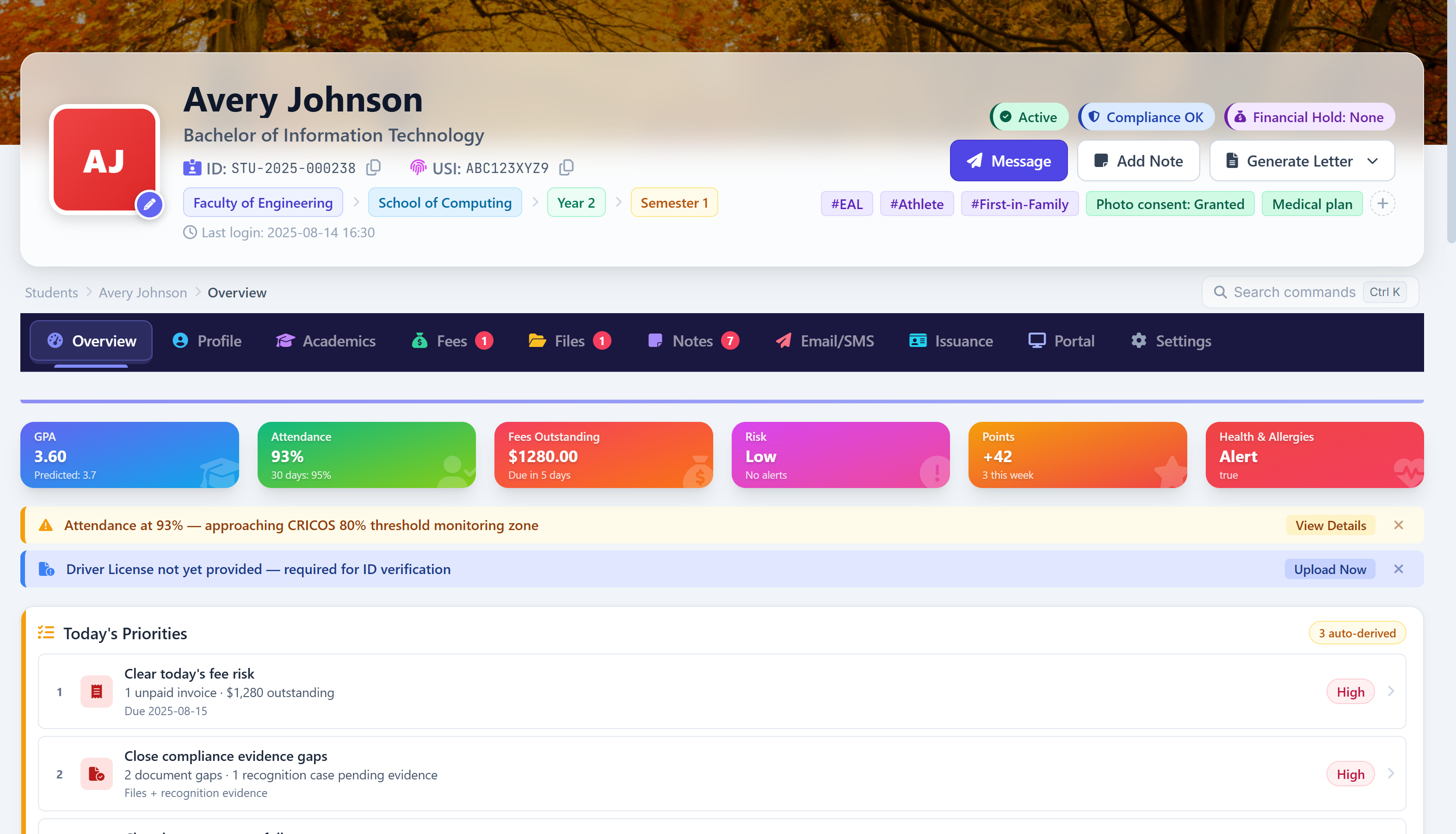
Academyship university operations dashboard
The Problem

When University Systems Make Teams Carry Gaps

Disconnected records. Repeated admin. Slower decisions.

Teams see different parts of the same student journey.

When systems do not connect, people become the integration layer.

Admissions, faculties, student services, finance and academic teams often work from separate systems. Staff repeat updates, reconcile records and chase context before they can act.

Disconnected Records

One student. Too many versions.

Applications, enrolments, academic records, support and finance can sit in separate tools — creating duplicate work and conflicting answers.

Rigid Structures

Complex structures need more than a template.

Faculties, departments, programs, units and different study periods do not fit comfortably inside a school-shaped or one-size-fits-all hierarchy.

Timetable Complexity

More choices. More moving parts.

Classes, rooms, teaching staff and study periods change constantly. Basic scheduling tools make coordination harder than it needs to be.

Slow Cross-Team Handoffs

The record moves. The context gets lost.

When admissions, academics, support and finance hand work between systems, staff spend time finding the latest status instead of progressing the student.

Why Academyship

Built For The Complexity Behind Higher Education

For faculties, programs, study periods and operations that never fit a basic template.

Depth without clutter

Depth, not clutter

Built for complex
university work

For faculties, study periods, student services and reporting demands.

Flexible Structure

Model the institution your own way.

Connected Records

Keeps operational context in one place.

Scales Cleanly

Adds complexity without a rebuild.

Connected Institution

Fewer systems.
Cleaner handovers.

One workspace keeps student context moving between teams.

Single Data Path
Less Rework
Linked Records
Cleaner Handover
Shared Context
Faster Action

University-Shaped

Fits your university — no forced model

Matches your academic levels without rigid setup.

Faculties & Departments Programs & Units Study Periods Multi-Campus

Leadership Clarity

See the institution, keep the detail

Connected records help leaders act from current answers.

Current Records
Institution View
Faster Action
Clean Reporting

Access and Trust

Right access for
every role

Give each team the right access and oversight.

Strict Access
Clear Ownership
Auditable Actions
AUSTRALIAN HIGHER EDUCATION

Built Around How Universities Actually Operate

Configure academic structures, study periods, student records, USI workflows, access and multi-campus operations without forcing every faculty into the same model.

Flexible Academic Structure

Model faculties, departments, programs, sessions, semesters, courses, units and other supported academic levels around your institution.

Faculties Programs & Units

Multiple Study Periods

Organise different calendars, sessions and teaching periods across programs while keeping the academic structure clear.

Study Periods Calendars

USI Verification

Keep supported USI verification connected to student records and resolve mismatches earlier in the student lifecycle.

Individual & Bulk History

Student Progress & Support

Keep academic activity, support actions and follow-up connected so authorised teams can see the context before acting.

Progress Support Actions

Multi-Campus Operations

Separate campus-level access and operations while giving authorised leadership a consolidated institutional view.

Campus Access Leadership View

Governed Access

Use roles, permissions and activity history to control access across sensitive student, staff, finance and operational records.

Role Control Audit History
Review Security & Implementation

For universities that need a clearer rollout, security and data-readiness discussion before switching systems.

Academic Structure

Build Your Academic Model Around Your University

Configure faculties, departments, programs, study periods, units and teaching groups around the structure your institution already uses.

Keep supported academic levels connected without forcing every faculty or program into the same rigid hierarchy.

Faculties & Departments

Start With The Institution

Represent faculties, schools and departments as the organisational layers that own programs, staff and academic activity.

  • Faculties & schools
  • Departments
  • Academic ownership
Faculty and department structure in the academic hierarchy

Programs & Periods

Keep Academic Offerings Clear

Connect programs and courses to the semester, trimester or session structure used to organise delivery.

  • Programs & courses
  • Study periods
  • Delivery structure
Programs connected to semester and session study periods

Units & Teaching

Connect Delivery To Structure

Keep units, subjects, classes and teaching groups connected to the program and study period they belong to.

  • Units & subjects
  • Classes & groups
  • Teaching context
Units and teaching groups connected to their program

Assessment & Outcomes

Carry Structure Through Learning

Connect modules, assessment, grading and learning outcomes to the academic structure above them.

  • Assessment
  • Grading
  • Learning outcomes
Assessment and grading linked to learning outcomes

University Operations

See The Whole University. Keep The Detail.

Move from institution-wide oversight to the student, program or operational record that needs action.

Open the same operational depth for one program without moving to a disconnected system.

  1. Institution Overview — demonstration data
    Active Programs 42
    Programs Under Review 3
    Units Without A Coordinator 7
    Study Periods Open 2
    Open Follow-Up Actions 18

    Institution Overview

    One University-Wide View

    Faculties, programs and study periods side by side

    Compare faculties, programs, study periods and operational status in one place. Filter by faculty, owner or status, then open the record that needs action.

    • Filter by faculty, program or study period
    • Save the views your team returns to
    • Move from a summary to the source record
  2. ProgramUnitsEnrolledStatus
    BIT Information Technology32486On Track
    BBus Business28612On Track
    BEng Civil36274Review
    MTeach Secondary16158Review
    BNurs Nursing30391On Track
    MData Analytics1288Unstaffed

    Academic Delivery

    Programs, Units And Teaching In Context

    Delivery records connected to the structure above them

    Keep programs, units, classes and teaching activity attached to the faculty and study period that owns them, instead of split across separate systems.

    • Programs, units and classes
    • Teaching groups and staffing
    • Delivery records in context
  3. StudentProgramFlagOwner
    S. AlmeidaBIT2 assessments dueP. Delacroix
    T. NgataBBusOn trackC. Marchetti
    R. OkonkwoBEngAt riskK. Rasmussen
    A. WhitfieldBNursSupport plan openNot assigned
    J. FerreiraMTeachOn trackN. Osei
    M. KaradenizMDataResults pendingK. Rasmussen

    Student Progress

    See Support And Follow-Up Earlier

    Assessment, results and owned follow-up together

    Bring assessment activity, results, support actions and follow-up into one operational view, with the responsible owner attached to each item.

    • Assessment and results
    • Support actions and notes
    • Owned follow-up
  4. Operational snapshot — demonstration data
    Fees collected this period 86%
    Invoices overdue 54
    Staff records complete Verified
    Documents awaiting signature 12
    Reports scheduled 9

    Operational Oversight

    Finance, Staff And Reporting Together

    The records that surround academic delivery

    Give authorised teams a clearer view of the finance, staff, communication, document and reporting records that surround academic delivery.

    • Fees, invoices and payments
    • Staff records and permissions
    • Reporting and activity history

Institution-wide and single-program views share the same core areas: Overview, Structure, Enrolments, Delivery, Assessment, Support, Finance and Reporting.

All names, figures and records shown here are fictional demonstration data.

Academics, Students & Governance

Core University Workflows, Connected

18 Connected Features

Connect academic delivery, students, admissions, finance, staff, communication and governance around the same operational records.

Academics Students Timetables Finance Governance
📚

Academic Delivery & Assessment

Run teaching and assessment in context

Connect structure, schedules, class activity, attendance and assessment without forcing every program into the same workflow.

🧭

Academic Hierarchy

🗓️

Timetable Builder

✅

Attendance

🖥️

Teaching Workspace

📝

Exam Master

🎓

Online Exam

🎒

Students & Enrolment

Connect the student journey end to end

Keep admissions, student records, support, portal access, USI and payments connected around the same person.

👤

Student Management

📨

Advanced Admission Engine

🔑

Student Portal

🤝

Student Support

🆔

USI Verification

💳

Fees & Quick Pay

🏛️

Operations & Governance

Keep operations clear and accountable

Manage staff, access, hiring, documents, communication and reporting with clearer ownership and fewer disconnected tools.

👥

Employee Management

🧲

Recruitment

🔐

Roles & Permissions

✍️

E-Signature

✉️

Email & SMS

📊

Reports & Audit History

Three connected areas. Eighteen essential university features. Scan the coverage, then hover or tap any feature for a quick explanation.
Academic delivery coordinated across programs, units and classes in Academyship

ACADEMIC DELIVERY

Coordinate Academic Delivery
Without Losing Context

Programs, units, classes, timetables, attendance, assessment and results — connected around the structure that delivers them.

University delivery changes by program, study period, campus and teaching model. Staff should not have to reconstruct that context from separate systems.

Academyship keeps the academic structure, teaching activity and student records connected so authorised teams can move from the big picture to the exact class, unit or student that needs attention.

No disconnected delivery records. No repeated context hunting. No rigid school-style workflow.

Explore Academic Operations →
  • Program and unit structure
  • Timetables and teaching activity
  • Assessment and results
Students accessing timetables, documents and payments through the Academyship student portal

STUDENT SELF-SERVICE

Give Students One Place
To See And Act

Timetables, academic information, invoices, documents, messages and supported actions — in one student-facing experience.

Students lose confidence when important information is spread across unrelated portals, inboxes and office handoffs.

Academyship brings supported student-facing information and actions into one portal so students can find what they need and staff spend less time repeating the same answers.

Fewer scattered updates. Fewer routine chases. A clearer student experience.

Explore Student Experience →
  • Student portal and academic information
  • Payments and documents
  • Updates and communication
Student support requests, actions and follow-up tracked against the student record

STUDENT SUPPORT & FOLLOW-UP

Keep Support, Approvals
And Follow-Up Visible

Student needs, requests, support actions, documents and responsible staff — kept in a clearer operational trail.

Support work slows down when context sits in inboxes, private notes and separate team systems.

Academyship helps authorised teams keep student support and follow-up connected to the relevant record, with clearer ownership and less repeated explanation.

No hidden follow-up. No lost context. No unclear ownership.

Explore Student Support →
  • Student support records
  • Owned follow-up actions
  • Connected communication

Advanced Timetabling

Build Timetables Around
How University Teaching Works

Coordinate study periods, classes, rooms and teaching staff, review supported clashes, and adjust with clearer context.

Study Periods & Classes

Semester 1 — demonstration data
Classes scheduled 318
Awaiting a room 12
Awaiting a teacher 7
Published to students 299
Teaching weeks 12 of 13
  • Semesters, trimesters and sessions
  • Classes and teaching groups
  • Program and unit context

Rooms, Staff & Clash Checks

ClassRoomStaffCheck
BITU201 · Lab AEng 2.14P. DelacroixClear
BBUS110 · LectureMain 1.02C. MarchettiClear
BENG240 · StudioEng 2.14K. RasmussenRoom clash
BNUR130 · TutorialHealth 3.07N. OseiCapacity
MDAT510 · SeminarNot assignedK. RasmussenStaff clash
MTCH220 · WorkshopEd 1.11A. WhitfieldClear
  • Rooms and capacity
  • Teaching staff availability
  • Supported clash and rule checks

Review & Adjust

Open issues — demonstration data
BENG240 · Studio Room double-booked
MDAT510 · Seminar No room assigned
BNUR130 · Tutorial Over room capacity
BITU201 · Lab A Resolved
Queue owner C. Marchetti
ChangeScopeOperatorOutcome
TT-0184BENG240 roomC. MarchettiPending
TT-0181MDAT510 staffP. DelacroixPending
TT-0177BNUR130 roomN. OseiApplied
TT-0172Semester 1 publishK. RasmussenApplied
TT-0166BITU201 timeC. MarchettiApplied
TT-0159Draft rebuildP. DelacroixApplied
  • Issue queue with owners
  • Targeted changes, not full rebuilds
  • Change, operator and outcome history

Clearer inputs, earlier clash visibility and faster adjustments.

All names, figures and records shown here are fictional demonstration data.

Admissions & Enrolment

Move Applicants From Enquiry To Enrolment

Keep enquiries, applications, documents, decisions and enrolment handover connected through one structured process.

  • Applications

    Capture Enquiries & Applications

    Bring applications into one organised workflow

    Enquiries and applications arrive in one organised pipeline, so admissions teams can see what has come in, what is progressing and what needs attention.

    • Enquiries
    • Applications
    • Applicant status
  • Review

    Review Documents & Missing Items

    Keep documents and review beside the application

    Track supporting documents, missing items and review activity on the application itself, instead of chasing them through email threads and shared folders.

    • Documents
    • Missing items
    • Review status
Semester 1 intake — demonstration data
Enquiries 412
Applications submitted 268
Awaiting documents 54
Awaiting decision 37
Offers accepted 141
ApplicantProgramDocumentsStage
S. AlmeidaBITCompleteOffer sent
T. NgataBBusCompleteIn review
R. OkonkwoBEng2 missingOn hold
A. WhitfieldBNursCompleteAccepted
J. FerreiraMTeach1 missingIn review
M. KaradenizMDataCompleteEnrolled
Decision queue — demonstration data
Ready for decision 31
Awaiting faculty review 18
Offers outstanding 22
Conditional offers 9
Decision owner P. Delacroix
HandoverIntakeStudentsOutcome
ENR-0412Semester 11413 pending
ENR-0407Summer session38Complete
ENR-0399Semester 2156Complete
ENR-0388Semester 1133Complete
ENR-0376Winter session27Complete
ENR-0361Semester 2148Complete
  • Decisions

    Keep Decisions & Offers Visible

    Make approvals and offers clear to the next team

    Approvals, application progress and offer activity stay visible against the applicant, so the next responsible team can see what has already happened.

    • Decisions
    • Offers
    • Status
  • Enrolment

    Hand Over Cleanly To Enrolment

    Carry applicant context forward without re-entry

    Accepted applicants move into enrolment with the application context already connected, so the same details are not entered a second time.

    • Enrolment
    • Connected context
    • Less re-entry

Built for admissions teams, faculty coordinators and the student administration staff behind every intake

All names, figures and records shown here are fictional demonstration data.

Finance, Payments & Payroll

Connect Tuition, Payments,
Payroll And Finance
In One View

Keep fees, invoices, payments and workforce costs connected to the records behind them.

Finance Management

Real-Time Financial Oversight

See The Operational Picture

Track supported income, expenses, balances and financial activity from one connected view. Give your team a clearer picture of budgets and transactions without reconciling separate tools first.

  • Income and expenses
  • Balances and transactions
  • Connected finance records
Budget vs Actual — Semester 1
Tuition Income $4,820,000
Academic Staff Costs $3,102,000
Faculty Operations $874,500
Net Position $843,500
Fees Collection

Tuition & Bulk Fee Collection

From Billing To Payment

Handle student fee collection with greater speed and consistency. Support bulk actions, reduce repetitive work and keep payment follow-up organised across the institution.

  • Student fees and invoices
  • Bulk collection workflows
  • Less manual chasing
StudentFee TypeAmountStatus
Aisha RahmanTuition$4,120Paid
James O'BrienTuition$4,120Paid
Sofia NguyenAmenities$320Pending
Marcus LeeTuition$4,120Overdue
Priya SharmaLab Access$185Paid
Liam TorresTuition$4,120Pending
Student Payments

Student Payments & Quick Pay

Make Payment Easier To Complete

Give students supported ways to view account information and complete eligible payments while keeping receipts and payment status connected to the account.

  • Quick Pay
  • Payment status
  • Receipts on the record
Student Account — S. Nguyen
Tuition — Semester 1 Paid
Amenities Fee Paid
Lab Access Fee Due 14 Mar
Balance Outstanding $185.00
Payroll

Payroll, Timesheets & Leave in One Place

Keep Workforce Costs Connected

Manage supported payroll, timesheets and leave together in one place. Reduce back-and-forth between systems and make staff payment processes easier to review and complete.

  • Easier pay runs
  • Timesheets and leave
  • Reduced admin effort
Payroll — April 2026
Dr Sarah Mitchell Paid
James Wong Paid
Priya Sharma Pending
Total This Run $318,420.00
Documents, Outputs & Automation

Turn University Records Into Documents Without Rebuilding Them By Hand

Reuse approved templates, live fields and connected records to reduce repetitive document work across the student lifecycle — with less manual formatting and fewer errors.

Certificates
Build branded certificates and awards from live student data.

Reuse approved templates and generate supported documents in bulk while keeping branding and output consistent.

  • Approved branded templates
  • Bulk generation
  • Faster issue and delivery
Certificate templates and bulk certificate generation
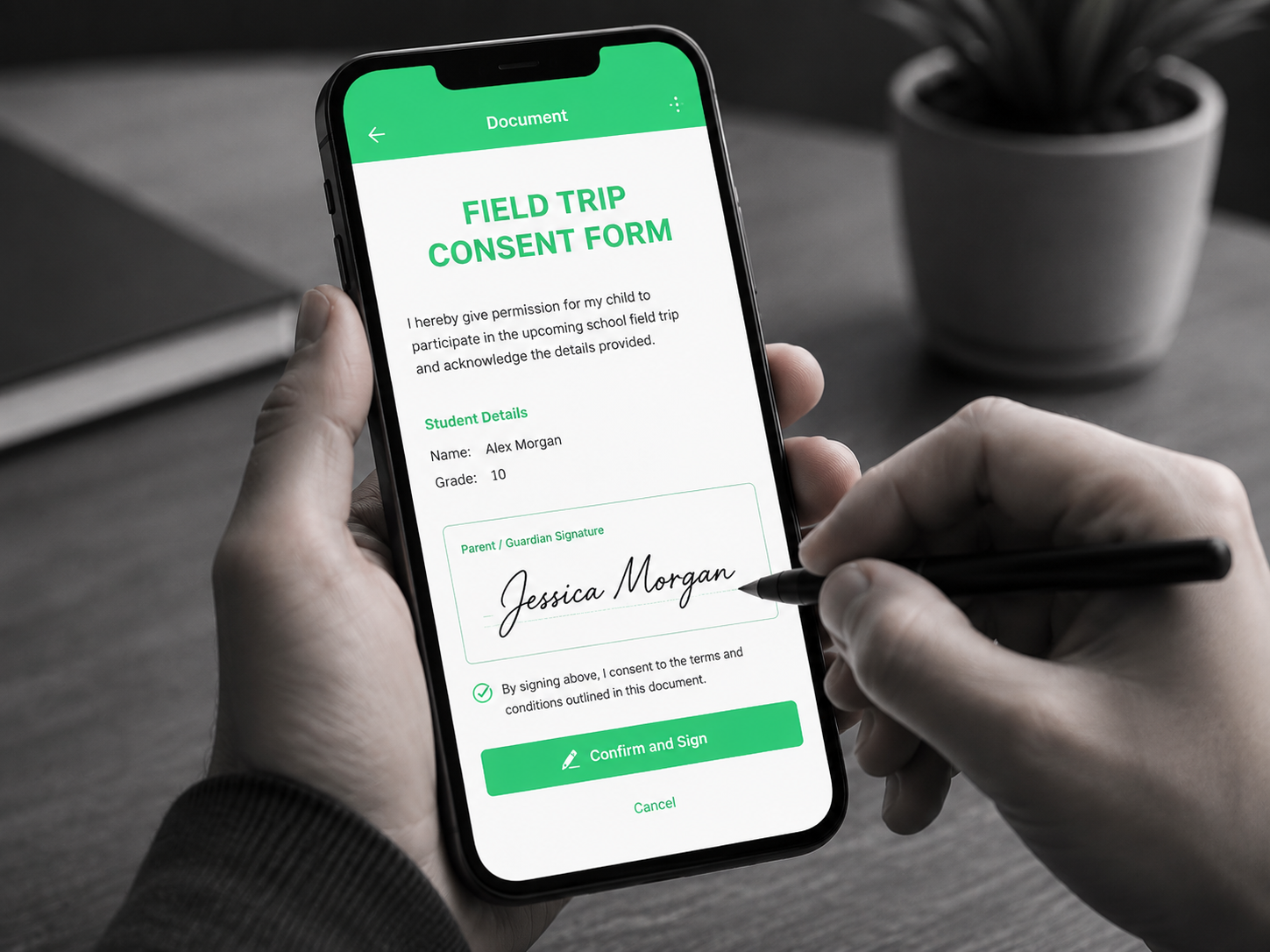
E-Signature
Send, sign and track approvals digitally without back-and-forth.

Send forms, agreements and approvals for digital signing while keeping status and signing history visible.

  • Digital signing
  • Bulk signing requests
  • Status and history retained
Digital signing workflow with status tracking
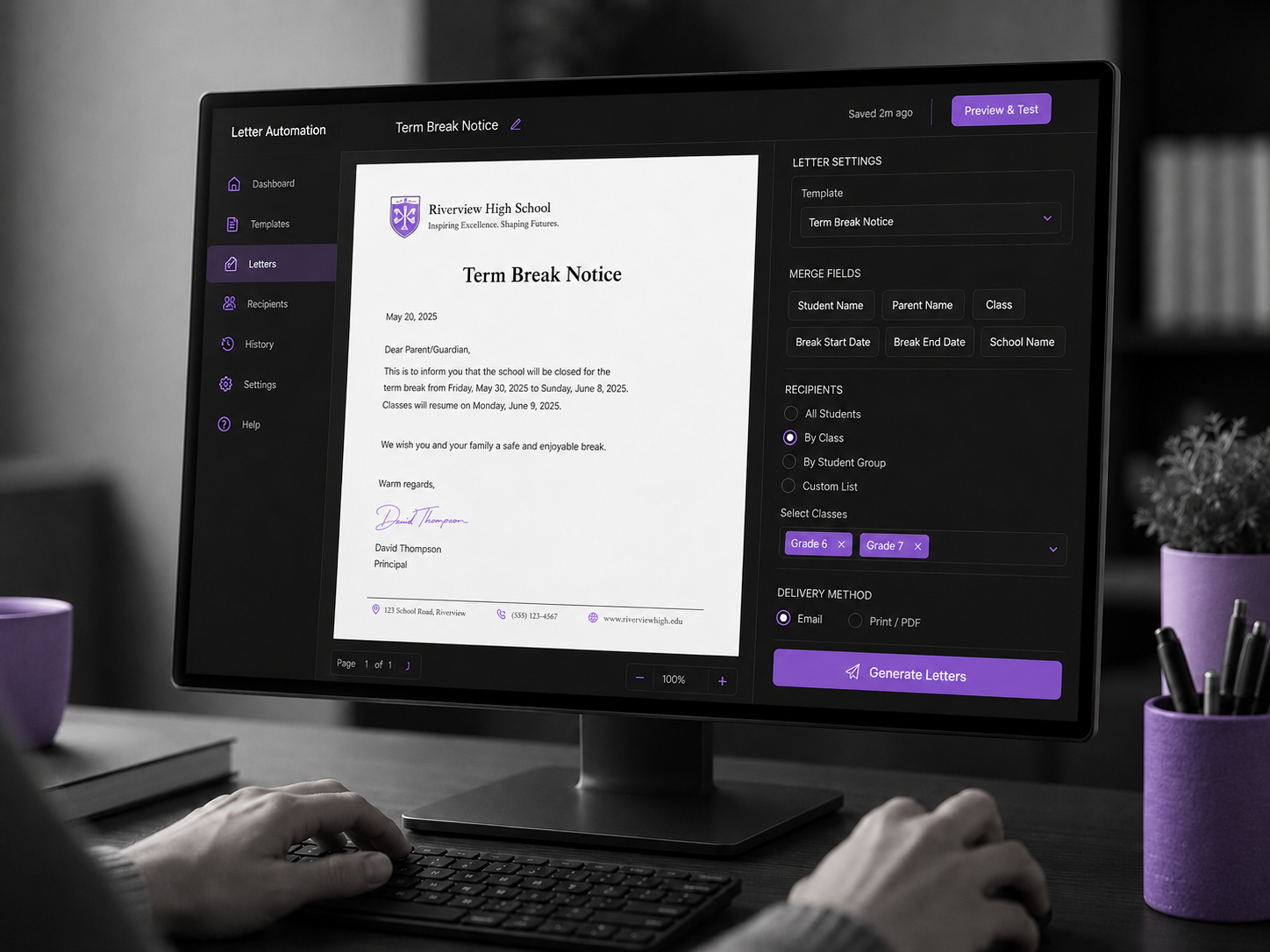
Letter Automation
Draft, personalise and deliver university letters in seconds.

Generate personalised letters and notices from approved templates using live student and institution fields.

  • Reusable templates
  • Live student fields
  • Less manual drafting
Reusable letter templates using live student fields
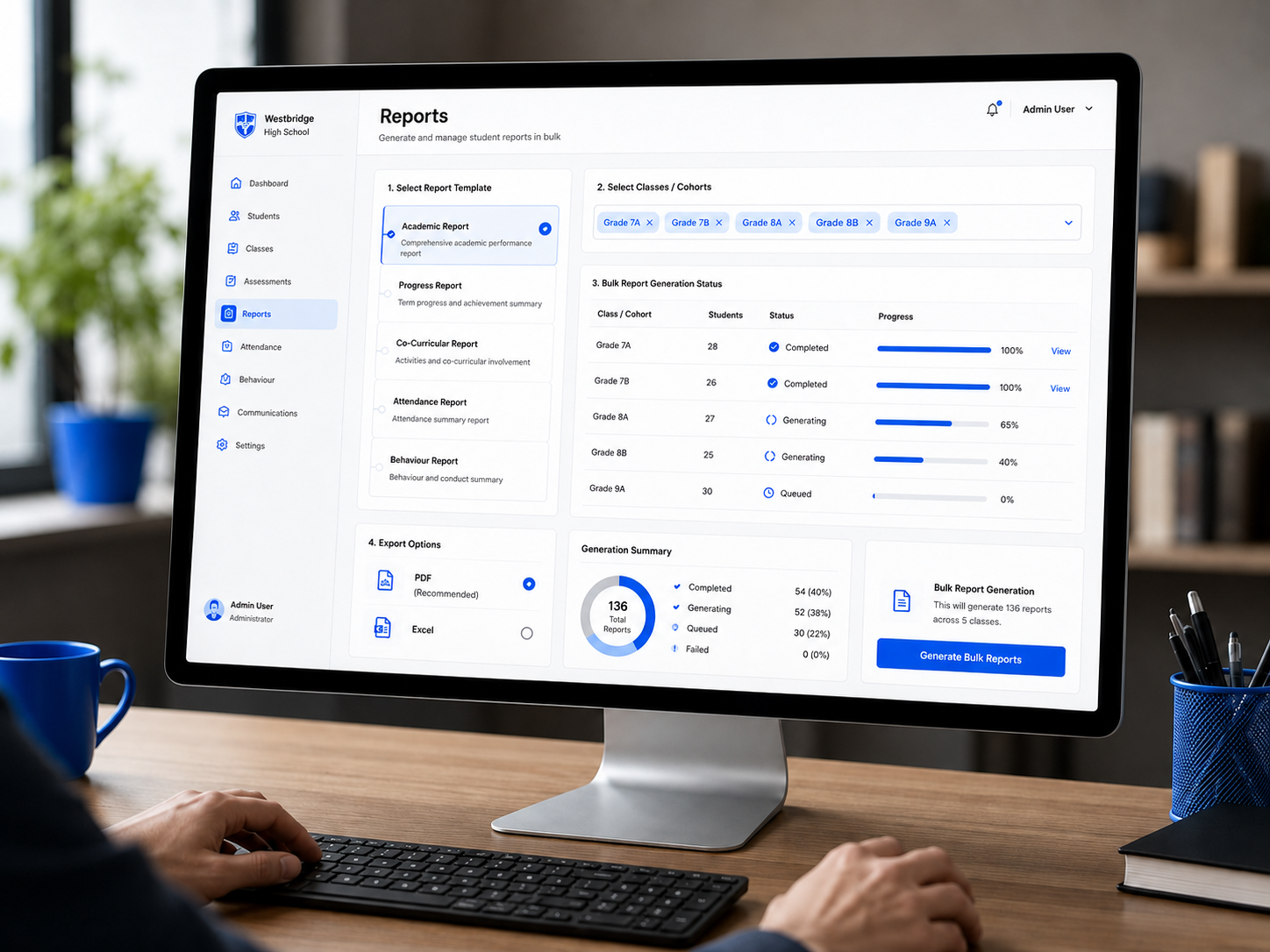
Reports
Turn connected records into clear operational reporting.

Review student, academic, finance and operational activity without rebuilding the same answers in spreadsheets.

  • Cross-module reporting
  • Export-ready outputs
  • Better operational visibility
Cross-module reporting and export-ready outputs

One System. Less Software.
More Control.

Academyship brings more university operations into one connected platform, so teams spend less time moving between separate tools.

One connected record

Students, academics, finance, staff and documents stay connected.

Less extra software

Reduce duplicate tools, spreadsheets and disconnected handovers.

Clearer oversight

Give authorised teams a clearer view across university operations.

Run more from
one platform

See platform coverage
Workspace Utilities

Everyday University Operations, Finally Connected

Some work sits between major systems — enquiries, bookings, recruitment, shared resources and day-to-day coordination.

When that work lives in spreadsheets, inboxes and memory, small tasks become delays, missed handovers and repeated chasing.

Academyship brings these everyday workflows closer to the same operating platform so teams can track work and move faster.

Front Office & Enquiries

Keep every first contact moving

Organise visitors, enquiries, handovers and day-to-day front-office activity so staff can respond faster and keep context visible.

  • Enquiries and follow-up
  • Visitor and contact logging
  • Clear reception handovers
Front office enquiry and visitor management screen

Bookings & Shared Resources

Make shared access easier to coordinate

Use supported booking workflows for appointments, rooms or shared resources where teams need visible availability and clearer scheduling.

  • Booking slots and availability
  • Rooms and shared resources
  • Clearer scheduling
Booking slots and shared resource availability

Recruitment

Keep hiring stages visible

Manage candidate records, applications and recruitment stages in one organised workflow so teams can see progress and next actions.

  • Candidate records
  • Hiring stages
  • Progress and next actions
Recruitment pipeline with candidate hiring stages

Inventory & Assets

Know what is held, moved and returned

Track supported stock, keys, kits and shared assets with clearer movement history and accountability.

  • Stock and asset tracking
  • Check-out and return history
  • Clearer accountability
Inventory and shared asset movement history
Productivity & Coordination

Give Every Team Faster Ways To Get Work Done

Connect the smaller operational tasks that create big delays
when they live in inboxes, spreadsheets and memory.

Tasks & Workflows

Keep tasks, deadlines, owners and updates visible in one place so important follow-up is less likely to disappear.

  • Owners and deadlines
  • Progress visibility
  • Priority and status tracking
  • Cross-team coordination
Internal Tickets

Log requests, assign owners and track progress through one support flow so staff can raise and resolve issues more clearly.

  • Internal request tracking
  • Ownership and status updates
  • Faster response coordination
  • Clear resolution history
AI Search

Search supported connected records in plain language and turn scattered information into useful answers without digging through multiple screens.

  • Natural-language search
  • Answer-focused reporting
  • Insights, not raw data
Voice-To-Text

Turn speech into supported notes, comments and updates to reduce repetitive typing for busy teams.

  • Faster note-taking
  • Less manual typing
  • Comments and observations
✓ Guided Setup ✓ Role Access ✓ Audit Logs ✓ AI Search
Bulk Actions & Notifications

Use supported bulk actions and notifications to reduce repetitive updates and keep the right people informed when a workflow allows it.

  • Bulk student and record updates
  • Bulk report and document runs
  • Workflow notifications
Shared Calendar

Organise events, reminders, deadlines and shared planning in one connected calendar so teams can coordinate important dates more easily.

  • Shared institution calendar
  • Events and deadline planning
  • Team coordination support
SECURITY & GOVERNANCE

Protect University Data
Without Slowing Teams Down

Apply role access, permissions, audit visibility, encryption, backup and identity controls across sensitive university operations.

Role-based
access

Control which authorised roles can view, edit, approve, manage or export supported records and actions.

Governed
permissions

Structured permission workflows keep responsibility clear across academic, student, finance and staff operations.

Backups &
recovery

Documented backup and recovery processes help reduce disruption and support operational continuity.

Monitoring & alerting

Monitoring and alert patterns help flag abnormal activity and platform health issues earlier.

Encryption
controls

Supported data is protected in transit and at rest through the platform’s documented encryption controls.

Academyship security controls preview

Australian data hosting

Australian-region hosting is available by arrangement. Confirm scope and availability with Academyship.

Audit
history

Retain supported activity history so authorised teams can review key actions and changes.

Multi-factor authentication

Support documented MFA options for eligible staff accounts, with enforcement policy set per institution.

Sign-in & SSO options

Google and Microsoft sign-in on paid plans, with custom identity provider, SAML and SCIM on Enterprise.

Decision Risks

Reduce The Risk Of Choosing Another System You’ll Outgrow

Universities are not choosing another isolated tool. They are choosing infrastructure that admissions, academic teams, student services, finance, staff and leadership may depend on every day. Academyship is designed to reduce the operational risks created by rigid structures, disconnected systems and difficult handovers.

Operating Model

No Forced Model

Your university should not bend around a vendor.

Academyship follows your supported academic structure instead of flattening it.

Your structureYour study periodsYour model
Academic Model Map
Programs & units Roles & permissions
Changeover

Safer Rollout

Changing systems should not derail the calendar.

Map, configure and validate in stages so teams can prepare before launch.

Guided setupStaged migrationLower disruption
Adoption

Staff Adoption

Powerful software fails when daily work feels harder.

Keep daily workflows clearer, so staff use the system instead of avoiding it.

Clear workflowsDaily usabilityLess friction
Leadership

Trusted Records

Leaders need confidence before acting.

Keep records closer to the source, so decisions rely less on reconciled spreadsheets.

Cleaner recordsBetter visibilityFaster decisions
Data Confidence
This Semester
Control

Governed Access

The right people need the right access — no more.

Roles and permissions keep responsibility clear and records protected.

Role permissionsTraceable accessClear ownership
Governance Checks
Risk Status
▲ A Access model reviewed
▲ R Record ownership clear
Growth

Room To Scale

Do not choose software you will outgrow again.

Build on a base that supports more students, more teams and more campuses.

Scalable setupMulti-campus readyConfigurable base
Migration & Rollout

Move To Academyship
Without Disrupting The Calendar

Replacing a university system should be mapped, staged and validated around active students, academic operations and staff access. The exact scope depends on the source systems, data quality and agreed implementation package.

Map

Map source systems, academic structures, owners and records before build.

01
02

Prepare

Clean source data, confirm identifiers, and agree the history in scope.

Configure

Configure faculties, programs, study periods, roles and workflows.

03
04

Validate

Check sample records, permissions and outputs before wider rollout.

Launch

Go live in stages, with clear ownership for questions and fixes.

05
Academyship Access Program

Supported Access For Organisations
Doing Work That Matters

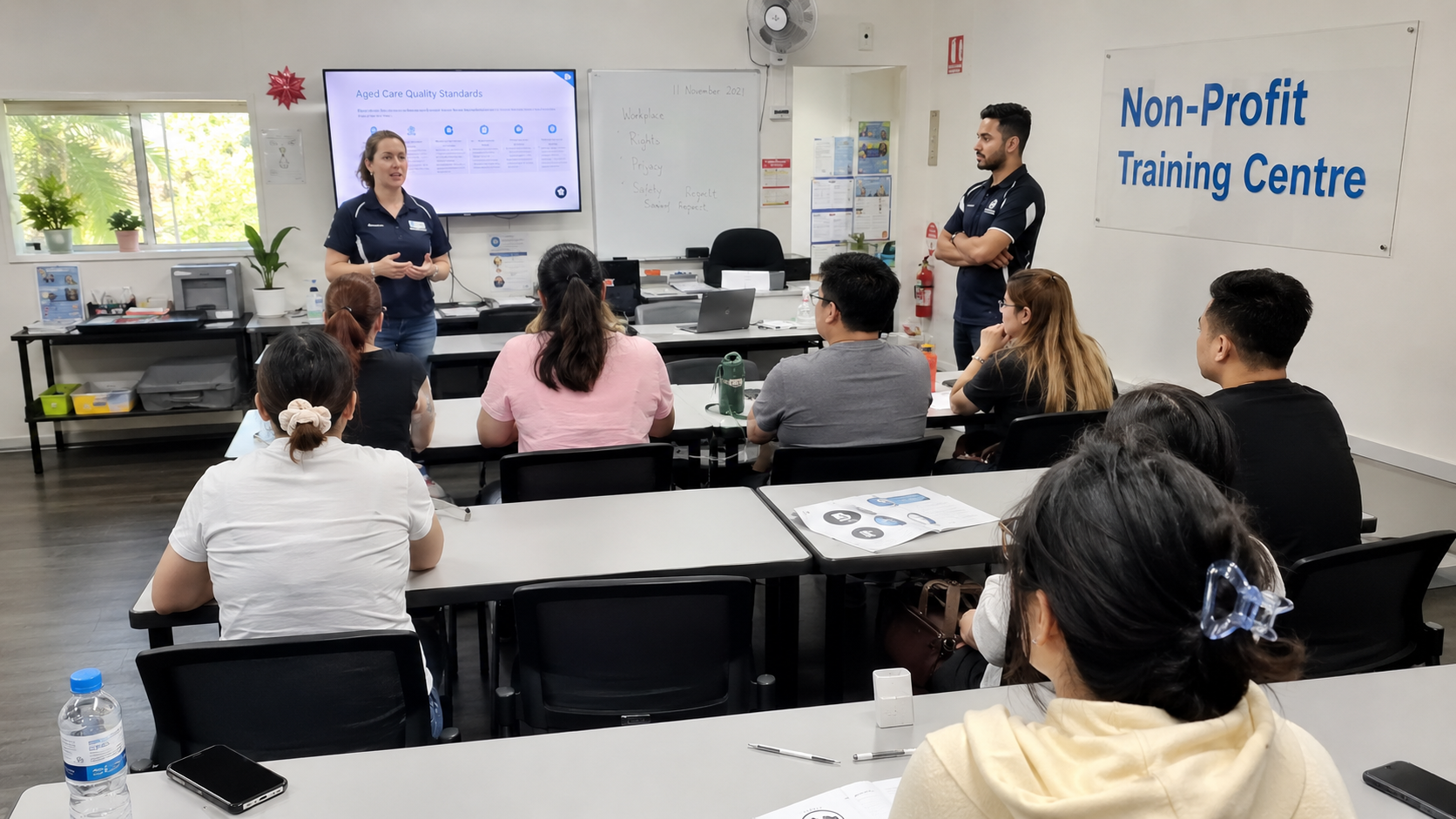
Selected not-for-profit, community, regional and high-impact education organisations may express interest.

Eligibility and any support offered are determined through the Access Program.

Not-for-Profit Providers Community Education First Nations & Remote Regional Access Disability-Focused Education Charities
Students and educators at a regional education provider
First Nations & Remote Support teams serving remote and regional communities.
Students supported in an inclusive education environment
Disability-Focused Built where student support workflows really matter.
Education support setting for students with additional needs
Community Education Reduce admin pressure around complex student support.
Not-for-profit education provider supported by the access program
Mission-Backed Providers Serious systems for stretched education teams.

University FAQs

Academyship is built around a configurable academic structure rather than one fixed school-style hierarchy. Supported levels can include faculties, departments, programs, sessions, semesters, courses, units, sections, classrooms and other academic components used by the platform.

This lets the institution organise connected workflows around its operating model instead of forcing every faculty or program into the same simplified structure.

Academyship can organise academic activity around the supported hierarchy and study-period levels configured for the institution, including structures such as sessions and semesters.

The exact configuration should be agreed during setup so the hierarchy, naming and downstream workflows match the university’s real delivery model.

The Admission Engine supports a structured flow from enquiry and application through review, supporting documents, approvals, offers and enrolment handover.

Keeping those stages connected reduces repeated data entry and gives admissions teams a clearer view of what has arrived, what is missing and what needs to happen next.

The current timetable workflow supports structured schedules with classes, rooms and staff in view, including supported clash and overlap checks, room and staff rules, and quick timetable adjustments.

Teams can plan around the configured study periods, see conflicts earlier and adjust a schedule without rebuilding it, so complex teaching patterns stay manageable when arrangements change.

The Student Portal gives students one place to access supported academic information, timetables, updates, documents and self-service actions made available by the institution.

Available information depends on the configured modules, permissions and workflows, so the portal can stay focused on what the university chooses to expose.

Academyship includes supported exam and online-exam workflows, including question-bank based preparation and automatic grading for supported objective questions.

Assessment and result workflows stay connected to the relevant student and academic context rather than being treated as isolated files.

Yes. USI Verification is included in the paid-platform feature set. Supported workflows can include individual and bulk verification, mismatch follow-up and retained verification history.

The university remains responsible for its own regulatory processes and for confirming how USI obligations apply to each student and course context.

Academyship connects supported fees, invoices, Quick Pay and payment activity to the student account so finance teams have clearer collection and follow-up context.

Exact payment methods, allowances and any add-on conditions stay aligned with the live Pricing and Payments configuration.

Academyship provides role and permission controls so administrators can define what authorised users can view, edit, approve or manage.

Multi-campus availability and allowances depend on the selected plan, so the public Pricing page remains the source of truth for campus limits and Enterprise requirements.

Identity options depend on the selected plan. The current pricing model includes Google and Microsoft sign-in on supported paid plans, with custom identity provider, SAML and SCIM options in Enterprise arrangements.

Multi-factor authentication is supported for staff sign-in, with enforcement policy set per institution.

Migration is scoped around the source systems, data quality, history required and implementation package. The process maps the source, prepares data, configures Academyship, validates representative records and then launches in controlled stages.

The goal is a structured transition with clear ownership, not an unrealistic promise that every university migration is identical.

Academyship applies documented role access, permission controls, activity history, encryption, backup, monitoring and identity practices across the platform. Exact security and hosting details match the live Security page.

Pricing supports a path from smaller plans to Enterprise for larger student populations, more complex requirements and expanded governance. The selected plan and contract determine the exact limits and services available.

Have more questions about Academyship?

Talk to us and we’ll map the right setup for your university.

CONTACT US

Built for Modern Universities

Ready To See How Academyship Would Run Your University?

Book a guided walkthrough and we’ll map Academyship against your admissions, academic structure, timetabling, student services, assessment, finance, staff access and reporting workflows.

Book a University Demo Contact Sales