Timesheets, attendance, leave, overtime and reimbursements.
Finance & HR · Payroll
Run Every Pay Cycle with the Right Inputs, Checks and Outputs Connected.
Bring employee pay settings, approved timesheets, leave, overtime and reimbursements into one controlled workflow. Preview the calculations, resolve exceptions, then produce every output from the run itself.
STP submission from Academyship
Rate, schedule, tax, super and bank detail complete.
Earnings, PAYG, super and net pay before anything is created.
Payslip documents and the files your banking workflow needs.
Register, PAYG and super summaries, leave and year-to-date.
Prepare, submit and track STP.
Why it goes wrong
Payroll Becomes Risky When the Inputs Live Everywhere.
A pay run is only as reliable as the records feeding it. When those records sit apart, the work is not the calculation — it is assembling what the calculation depends on.
Academyship makes the assembly the product.
- One employee payroll record the whole cycle reads from
- Approved time, leave, overtime and reimbursements in one period
- Readiness and exceptions surfaced before the run
- Payslips, payment files and reports produced from the run itself
- Every state change recorded against the person who made it
The same employee change is made more than once
A rate, schedule or bank change has to land wherever payroll reads it from. One copy is always last.
Employee records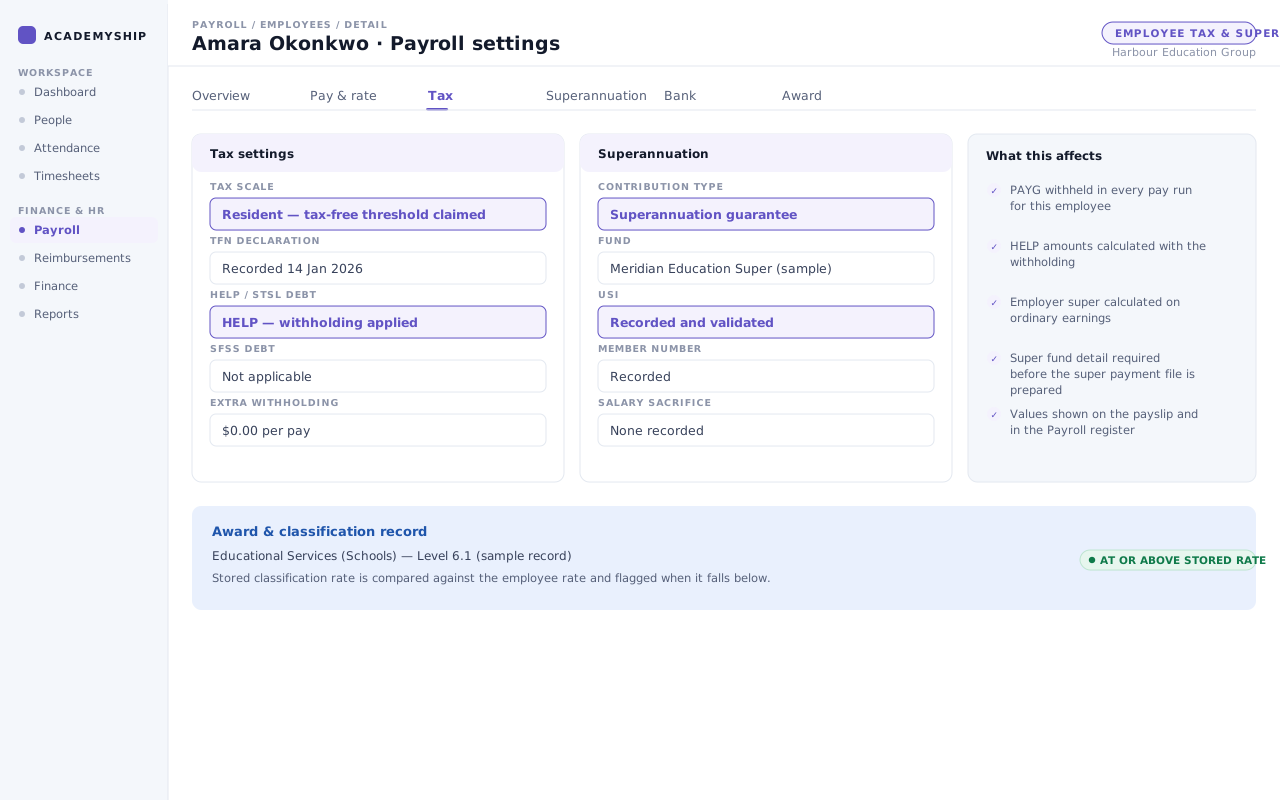
Time, leave, overtime and reimbursements arrive separately
Each input has its own approval path, and assembling them is work before the calculation starts.
Period inputs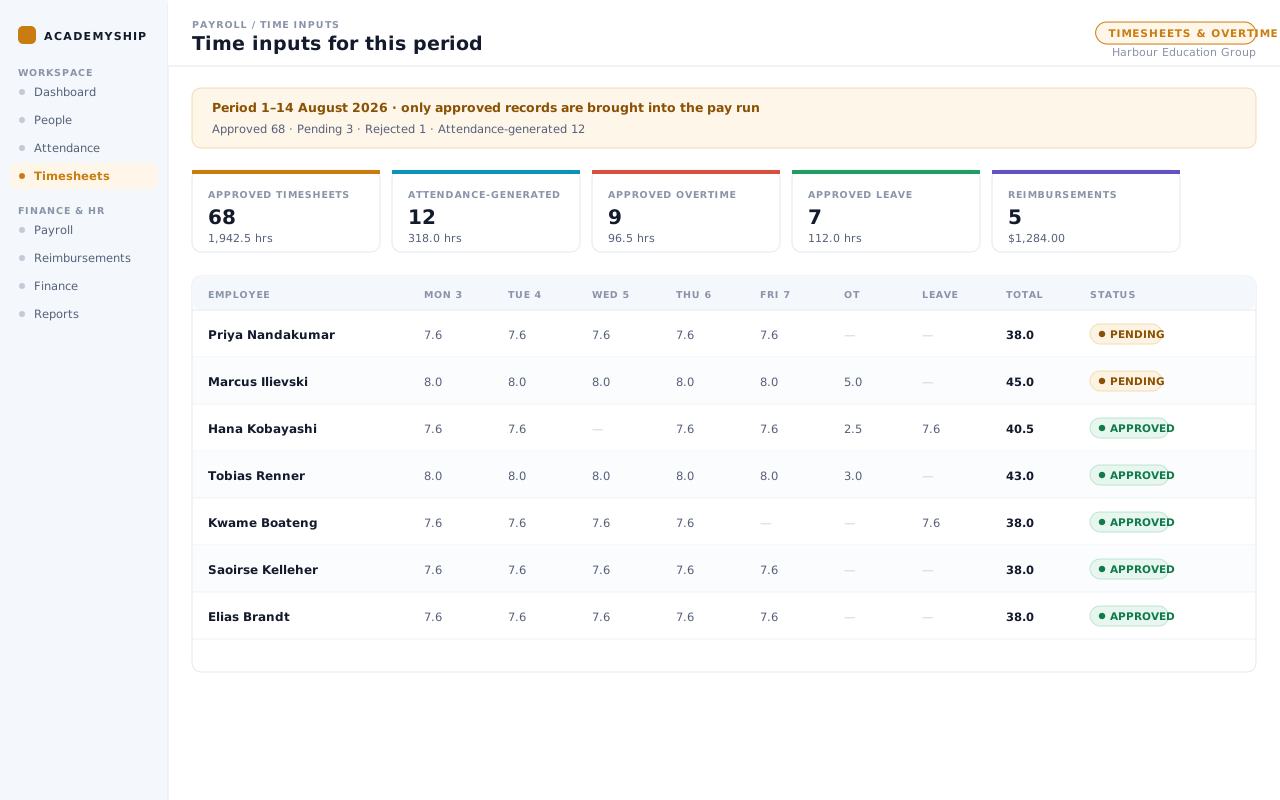
Missing setup is found at the worst moment
A missing fund, tax detail or bank account is cheap to fix early and expensive to fix during approval.
Readiness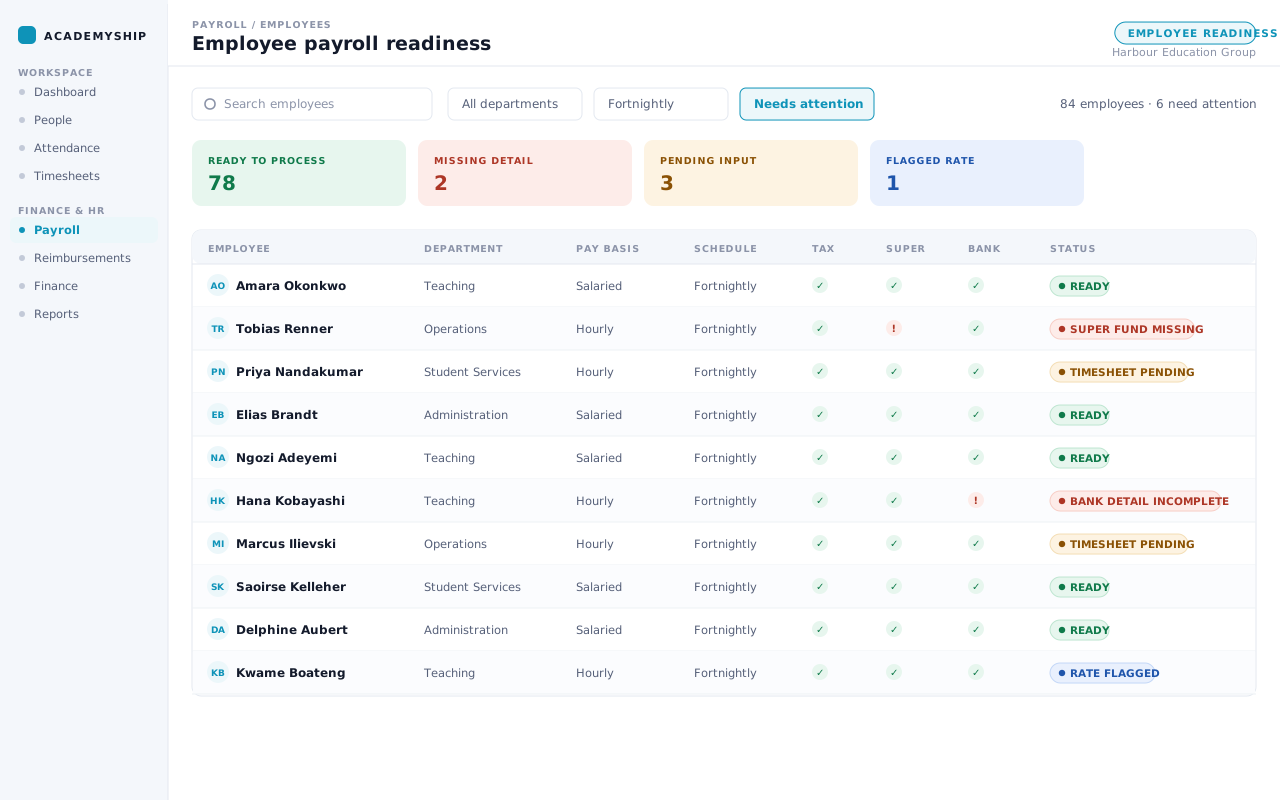
Approval is not the end of the work
Payslips, payment files and reports still have to be produced after the figures are agreed.
After approval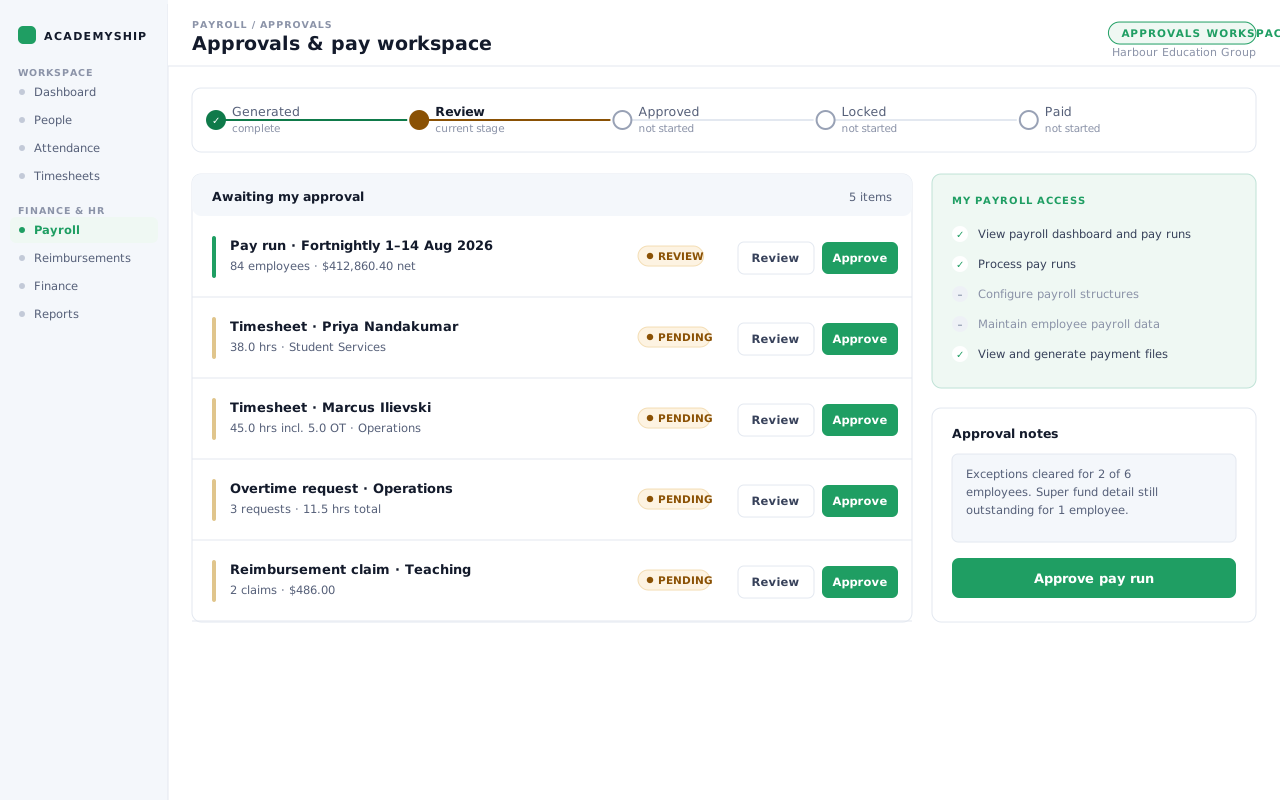
Connected Academyship data
Payroll Works Better When It Already Knows the Work.
Payroll sits between what your institution has already recorded and the records the cycle produces.
Feeds Payroll
- Employee payroll records
- Attendance
- Approved timesheets
- Approved leave
- Overtime requests and policies
- Approved reimbursements
Payroll processing
- Employee readiness
- Period and employee selection
- Calculation and preview
- Exceptions and review
- Controlled status changes
- Output preparation
Payroll produces
- Payslips and notifications
- Salary and super ABA downloads
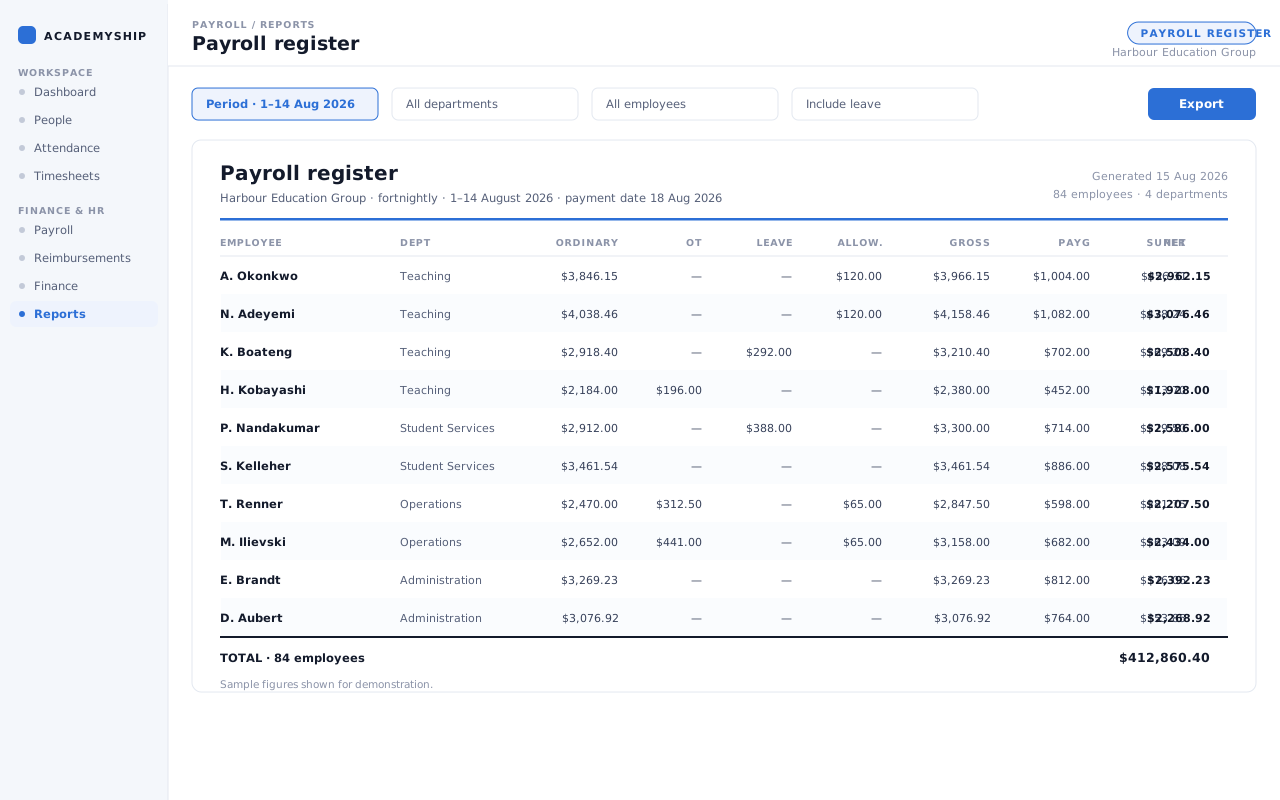
- Payroll register
- PAYG and super summaries
- Leave-liability and YTD reports
- CSV, PDF and ZIP exports
How a pay run works
Run a Full Pay Cycle in Four Steps.
Configuration, the run itself and Single Touch Payroll are one cycle, not three.
-
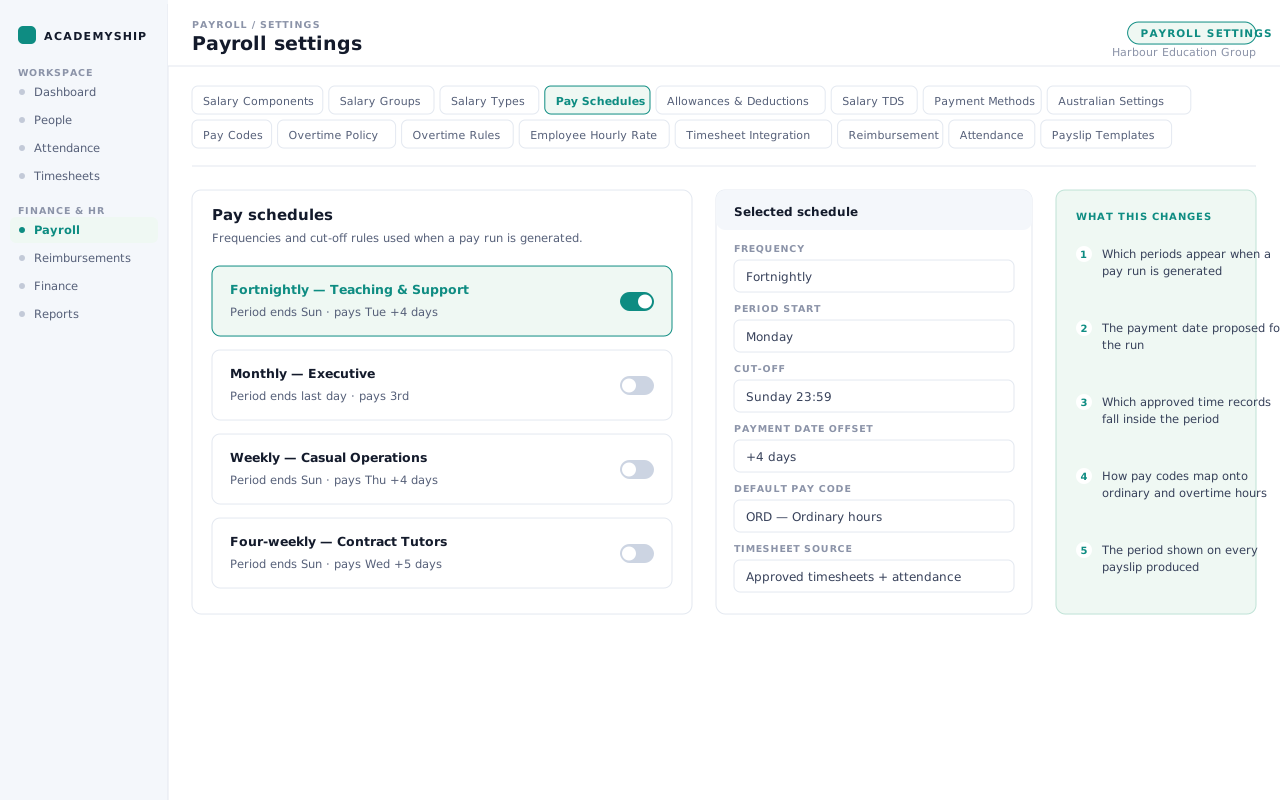
Set up once
Pay schedules, components, codes and rules are configured once, and every later cycle reads from them — along with award classifications, penalty rates, overtime policies and super funds.
Employee pay basis, rate, tax, super, bank and schedule detail is completed alongside them.
-
Bring in the period’s work
Approved timesheets, attendance, leave, overtime and reimbursements from inside the period are drawn in — only approved records, so the cycle starts from work already signed off.
-
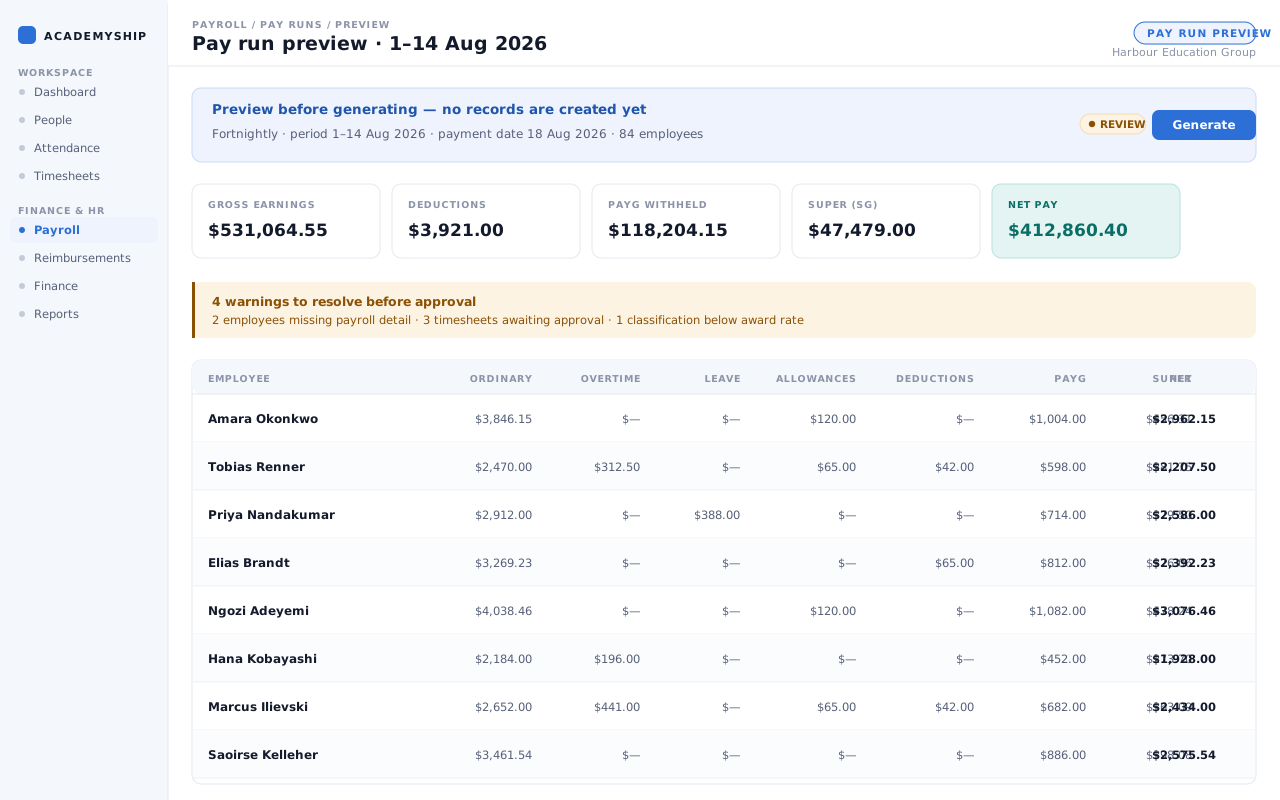
Preview, validate and process
Inspect earnings, deductions, PAYG withholding, super, net pay and every warning before a single record is created.
The run then moves through its states under whoever holds the scope to move it, and STP submission happens from the same workflow.
-
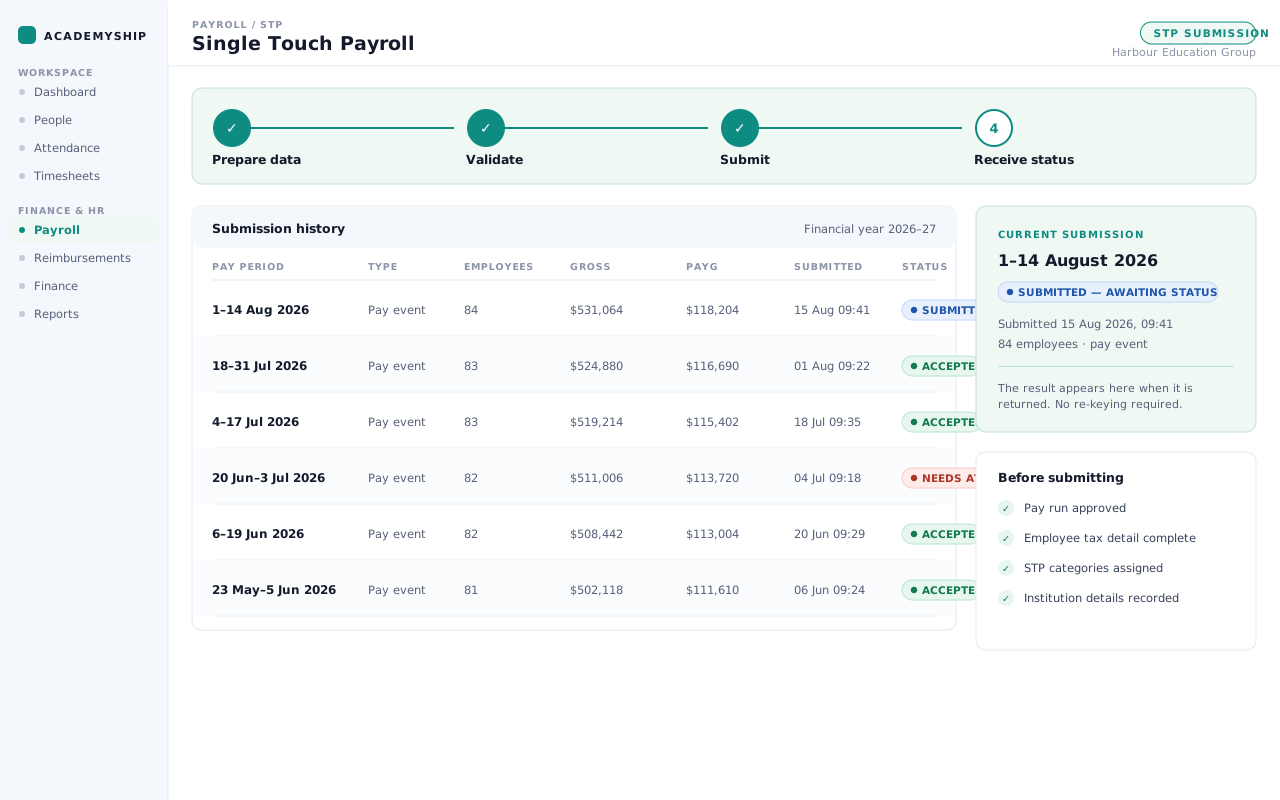
Produce outputs and follow the result
Payslips, salary and super payment files, notifications and the reports finance needs are generated from the run itself. The STP result returns to the same view.
What Payroll covers
Everything That Has to Line Up Before Payday.
Five areas of work, in the order a cycle needs them.
Academyship
01
Employee payroll setup
Keep each employee’s pay basis, frequency, rate, schedule and payment details ready before a run begins. Tax, super, award and classification records stay with that person.
- Employment basis and pay frequency
- Rate, salary type and pay schedule
- Bank, tax and superannuation details
- Award and classification records
Academyship
02
Time and adjustments
Bring approved timesheets, attendance, leave and overtime into the right pay period. The run starts from authorised work and adjustments, not scattered figures.
- Approved timesheets
- Attendance-generated time records
- Leave and leave loading
- Overtime requests, policies and rules
Academyship
03
Pay-run preparation and review
Choose the period and employees, then review earnings, deductions, PAYG, super and net pay before processing. Each run moves through generated, reviewed, approved, locked and paid.
- Weekly, fortnightly, four-weekly and monthly frequencies
- Period, payment date and employee selection
- Earnings, deductions, PAYG, super and net preview
- Generated, Review, Approved, Locked and Paid stages
Academyship
04
Pay structures and Australian controls
Configure salary components, allowances, deductions and pay codes once. PAYG, HELP, SFSS and award records then shape each calculation and raise below-rate warnings.
- Salary components, groups and types
- Allowances, deductions and pay codes
- PAYG, HELP and SFSS settings
- Award records with below-rate flags
Academyship
05
Payslips, payment preparation and records
Produce payslips and payment files from the reviewed run, then download, email or export the records. Separate salary and super ABA validation helps prepare accurate banking files.
- Individual payslip PDF
- Payslip email and bulk ZIP download
- Separate salary and super ABA files, validated
- Reports and CSV exports
Scroll sideways, or use the arrow, Home, End and Page keys, to reach every card.
The pay-run review cockpit
See the Whole Pay Run Before You Approve It.
Stage, readiness, exceptions, liabilities and activity in one view, so approval is a decision rather than a leap of faith.
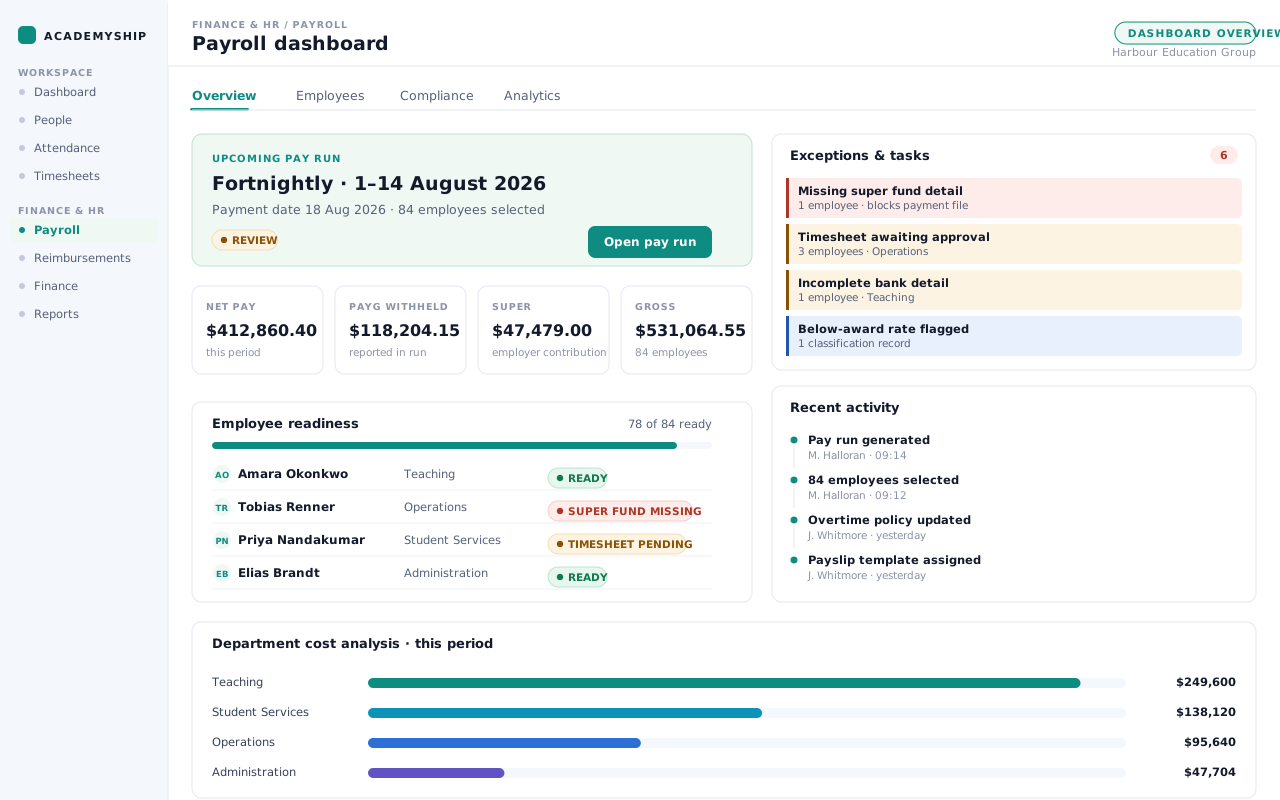
1
Current stage
Where this run sits: Generated, Review, Approved, Locked or Paid. The stage is written, never colour alone.
2
Employee readiness
Who is ready to process and who still has incomplete setup.
3
Exceptions first
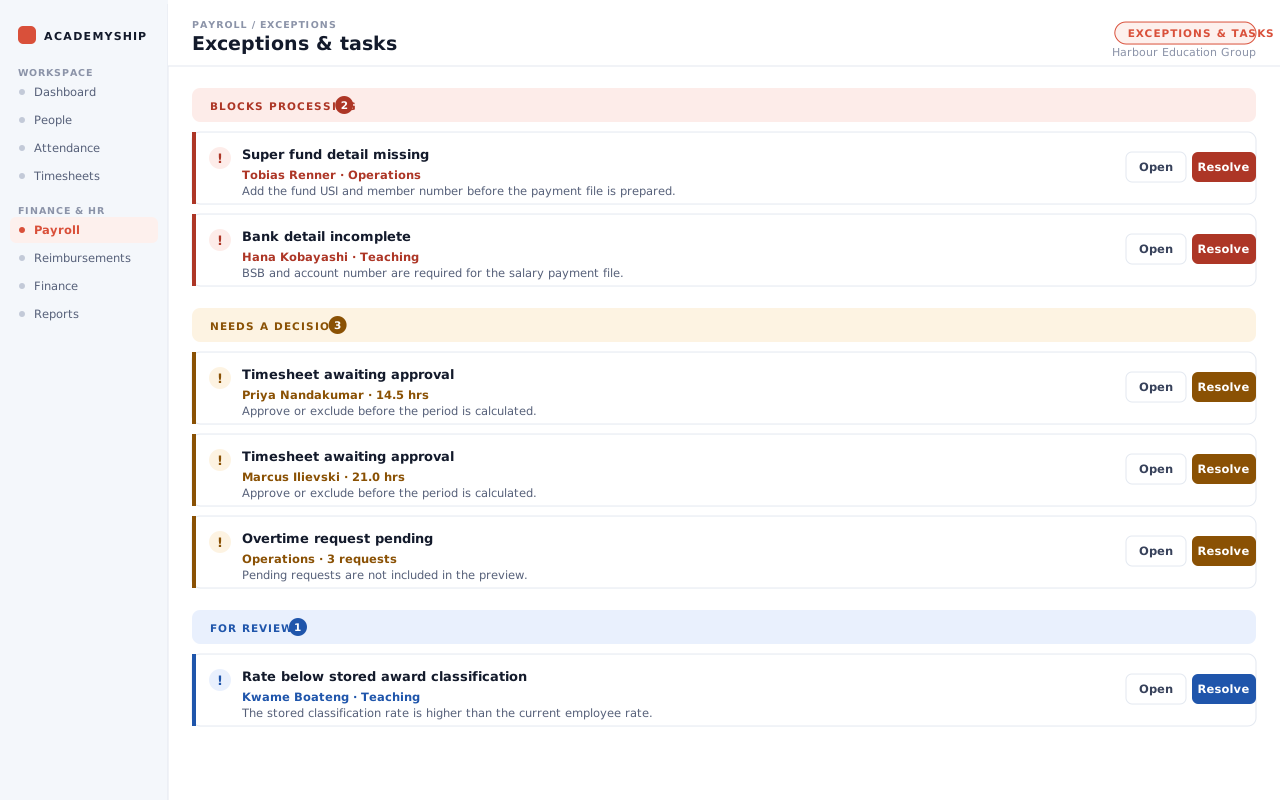
Missing details, pending inputs and below-rate flags, ordered by what blocks processing.
4
Liabilities in view
Net pay, PAYG withheld and employer super summarised alongside gross earnings.
5
Activity and oversight
Department costs and a record of who did what.
Fictional institution. Every name, figure and record shown on this page is invented for demonstration.
Bulk actions
Change a Whole Cohort at Once — and Take It Back Tomorrow
Award classification, employment basis, pay calendar, frequency and allowances, across a selection in one action.
Payroll administration is rarely one employee at a time. An award moves; a cohort shifts from casual to part-time. Academyship applies those to a selection in one action, each carrying an effective date.
Every bulk action is logged against whoever ran it and can be undone for 48 hours with a recorded reason.
- Award, basis, calendar, frequency and allowances
- Effective dates, not only today
- 48-hour undo with a recorded reason
Capability example
Guard rails
Settings That Refuse to Break Their Own History
A pay code or salary component still in use cannot be archived, and the refusal names what is holding it.
The damage in payroll is rarely the change someone meant to make. It is retiring a salary component that payslip lines still reference.
When in doubt, block. A false block costs one admin step; a false delete costs a year of payslips.
- Named references, not a generic error
- Assignments, group rows, payslip lines, policies
- A period already paid is never generated twice
Capability example
Reports and outputs
Finish the Pay Run with Usable Records — Not Another Round of Rework.
Reports
- Payroll register — PDF and CSV
- PAYG summary — Report and export
- Superannuation contributions — Report and export
- Leave liability — Report
- Employee year-to-date — Report
- Department cost analysis view
Documents and delivery
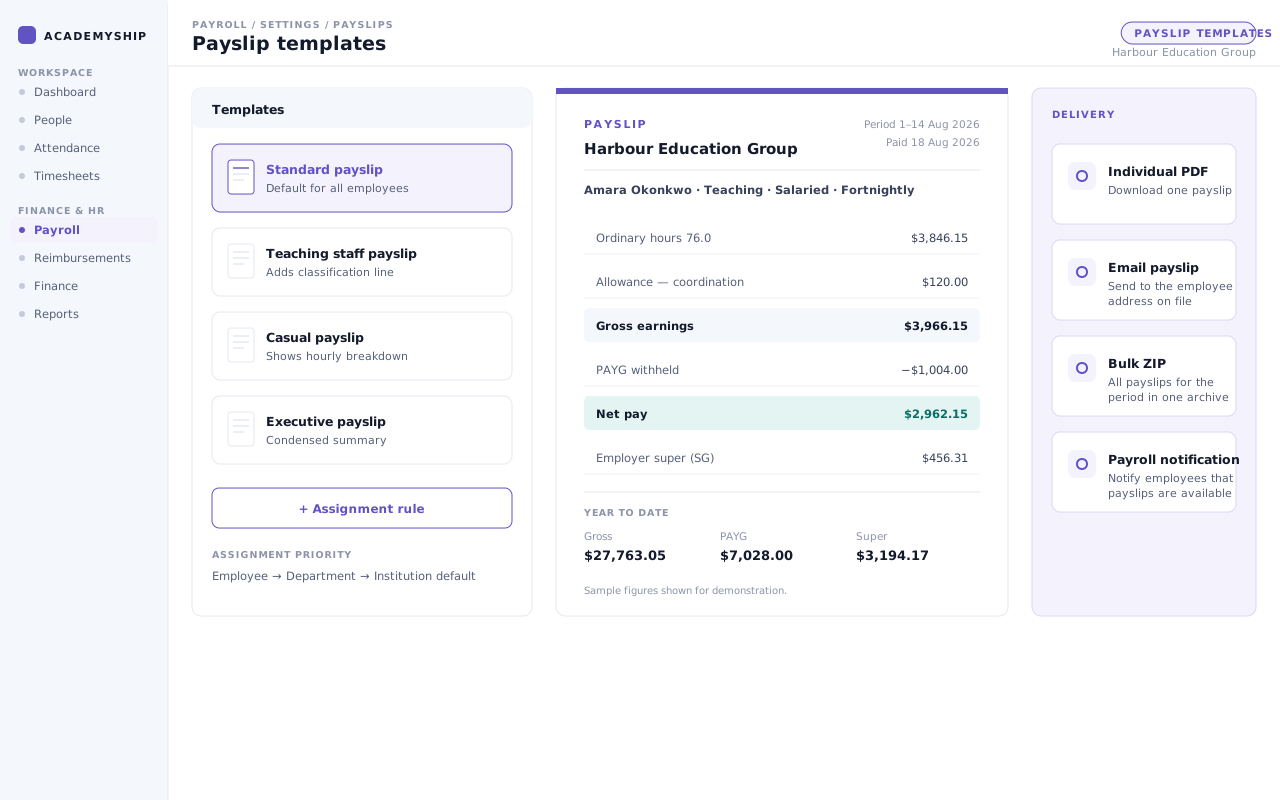
- Individual payslip — PDF
- Payslip email action — Email
- Bulk payslip download — ZIP
- Employee payroll notifications — In-app
Files and exports
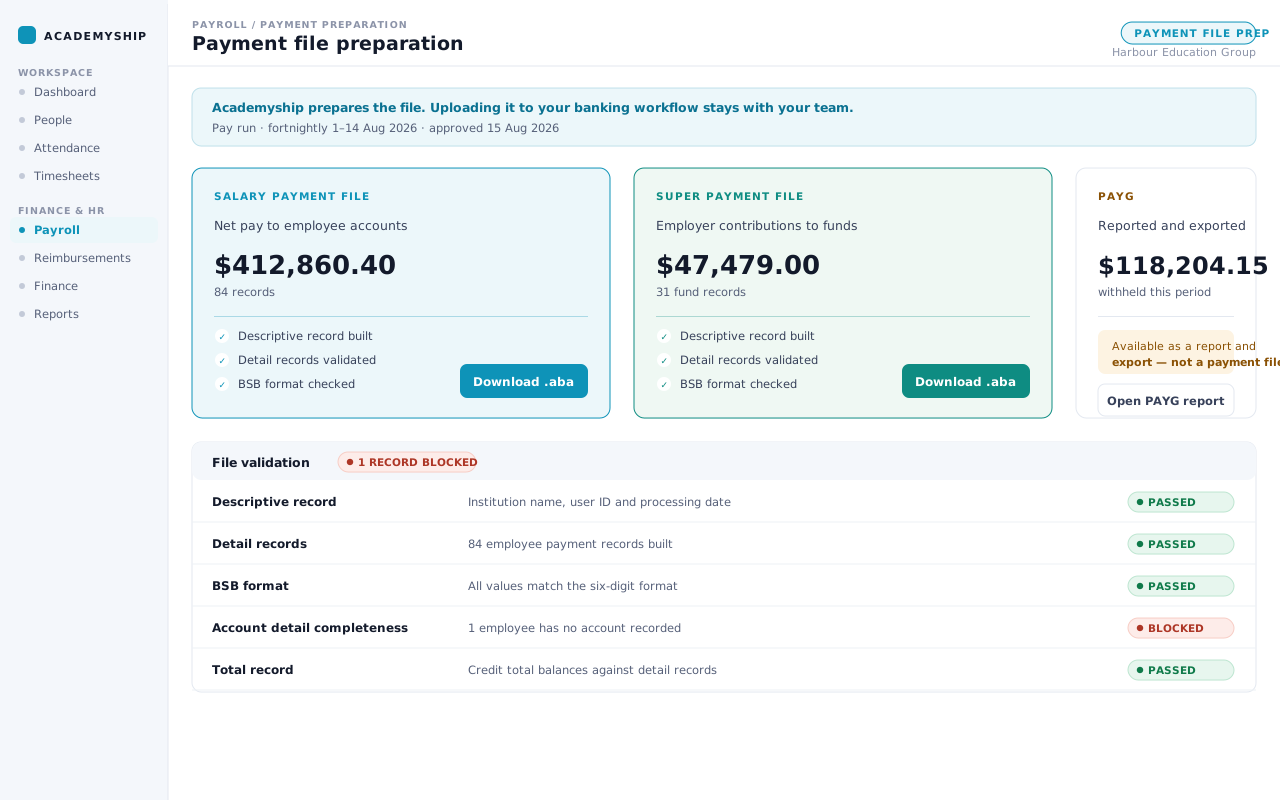
- Salary payment file — ABA
- Super payment file — ABA
- Basic employee template — CSV
- Full Payroll template — CSV
- Super-fund data template — CSV
Academyship prepares and validates the salary and super payment files; releasing payment stays with your team. PAYG withholding is reported and exported, not paid.
Configurability
Configure the Rules Once. Use Them Every Cycle.
Sixteen settings areas, grouped by the three questions they answer.
What an administrator can change directly depends on your workspace setup.
Access and responsibility
Control Who Can Process, Configure and Export.
Payroll permissions are granted as scopes, so an institution can shape them around how its team divides the work.
Responsibility group
Payroll processing
Runs the cycle and moves it through its stages.
- View the Payroll dashboard and pay runs
- Add and edit pay runs
- Work through exceptions before processing
What this group cannot do
Not settings, and not payment files.
Responsibility group
HR and configuration
Owns the rules and the employee record.
- Manage Payroll settings and salary structures
- Maintain awards, overtime rules and super funds
- View and edit employee salary, tax, super and bank records
Why this is separated
Whoever sets a rate is not whoever approves the run that pays it.
Responsibility group
Reporting and payment preparation
Produces the reports finance needs and the files your bank expects.
- View Payroll reports
- View and generate salary and super ABA files
- Export register, PAYG and super summaries
About payment files
Salary and super files generate separately, so payment preparation can go to one person without the pay run.

A dedicated place to approve
A view built around approval: the run, its inputs, the exceptions outstanding and that person’s own access.
How these scopes map onto your role names is yours to decide.
The run for someone leaving
Final pay is its own event, with accrued leave paid out by leave type and long service leave following the recorded rule.
Pro-rata on termination is a configured setting.
Super detail swept before payday
Fund records are checked in bulk for the detail a contribution fails without: ABN, USI and member number.
One pass covers every employee.
1 of 3
Closer in
Six Screens, and the Rules Working Underneath Them.
Six screens, and the rule each one enforces underneath.
-
Employee pay readiness
Rate, allowances, deductions, bank accounts and super funds arrive as one intake, reviewed before they become live payroll data.
-
Time and adjustments
A scheduled pass reads attendance against your overtime rules and raises the requests itself, or runs dry first to show what it would create.
-
Tax and superannuation
PAYG withholding scales one to six, study debts held separately, and super split by kind.
-
Payslip templates
Twelve configured layouts, each holding to one A4 page and masking bank detail.
-
Payment file preparation
The record structure a bank file uses: a header, one detail record per employee, and a total that has to balance.
-
Approvals and oversight
Every item carries its live pay effect, so approving is done against a figure. A rejection will not submit without a reason.
Questions
Payroll Questions, Answered Clearly.
The detail a payroll team asks about once the obvious questions are done.
Can an employee have their pay split across more than one bank account?
Yes. An employee can hold several accounts in a priority order, each taking a fixed amount, a percentage or the remainder. Details are stored encrypted and the payment file is built from them.
Can one employee pay superannuation into more than one fund?
Yes. Academyship holds one fund per contribution type, so the guarantee, salary sacrifice and voluntary contributions can each go to a different fund with its own member number, and each records how it was chosen.
How is the superannuation guarantee rate handled when it changes?
Rates are held against effective dates rather than copied onto the employee record, so a run applies the rate in force for its own payment date. The quarterly maximum contribution base is applied at the same point.
How are weekend, public holiday and shift rates applied?
As configured penalty rates with a multiplier — ordinary, time and a half, double time, double time and a half — against a day type and, where your rule draws one, a time window inside it. Academyship applies the rates you configure; it does not interpret an award for you.
How are leave entitlements and the leave liability figure handled?
Accruals are held in hours per leave type and period — accrued, taken, adjusted, balance — and priced at the employee’s rate, which is what the liability report reads from. Long service leave is configured by state or territory.
Can Academyship prepare salary and super payment files?
Yes — two separate ABA files, salary and superannuation, each validated before download. Your team releases the payment through your own banking workflow: Academyship never moves money, and PAYG withholding leaves as a report or export.
What Single Touch Payroll support is available?
Academyship supports STP submission from inside the Payroll workflow and lets your team track the result without leaving the product. Salary components carry their STP Phase 2 reporting category, and each submission is recorded against its pay run with a status history.
Finance & HR · Payroll
Ready to Make the Next Pay Run Easier to Control?
See how Academyship connects pay settings, approved work, review and Payroll outputs in one workflow.
PAYG, super and STP in one cycle
Scoped access by responsibility
Outputs produced from the run itself
A pay run moves through five states
- Generated
- Review
- Approved
- Locked
- Paid