Map each credential to its certificate, transcript and letter.
Comms & Tools · Certificates
Turn Verified Results into Credentials People Can Trust.
Configure each course once, issue the right certificate package to every eligible learner, review the real files, then release and verify them.
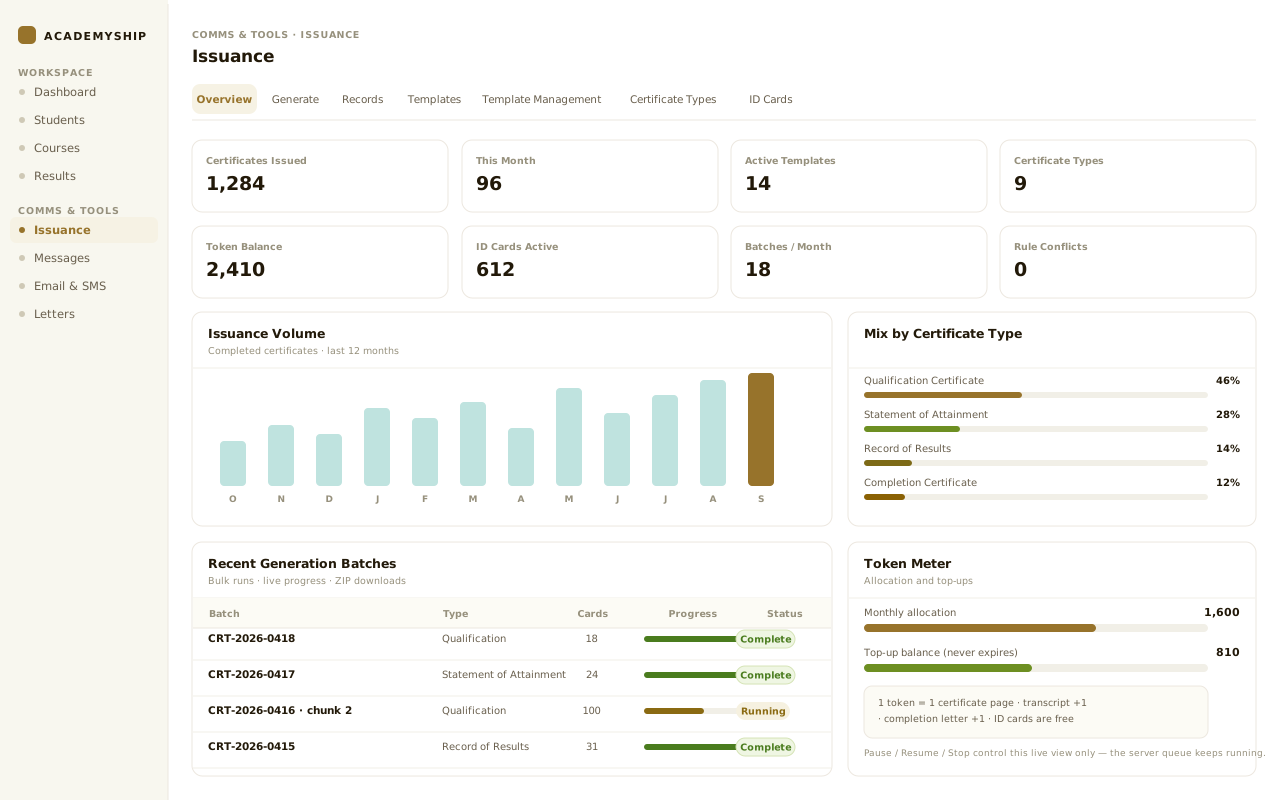
Plan the documents and token cost before generation
See who is ready, who is held and why.
Confirm recipients, documents and pages before launch.
Track processed, successful and failed items as it renders.
Open the real files, then approve or send the run back.
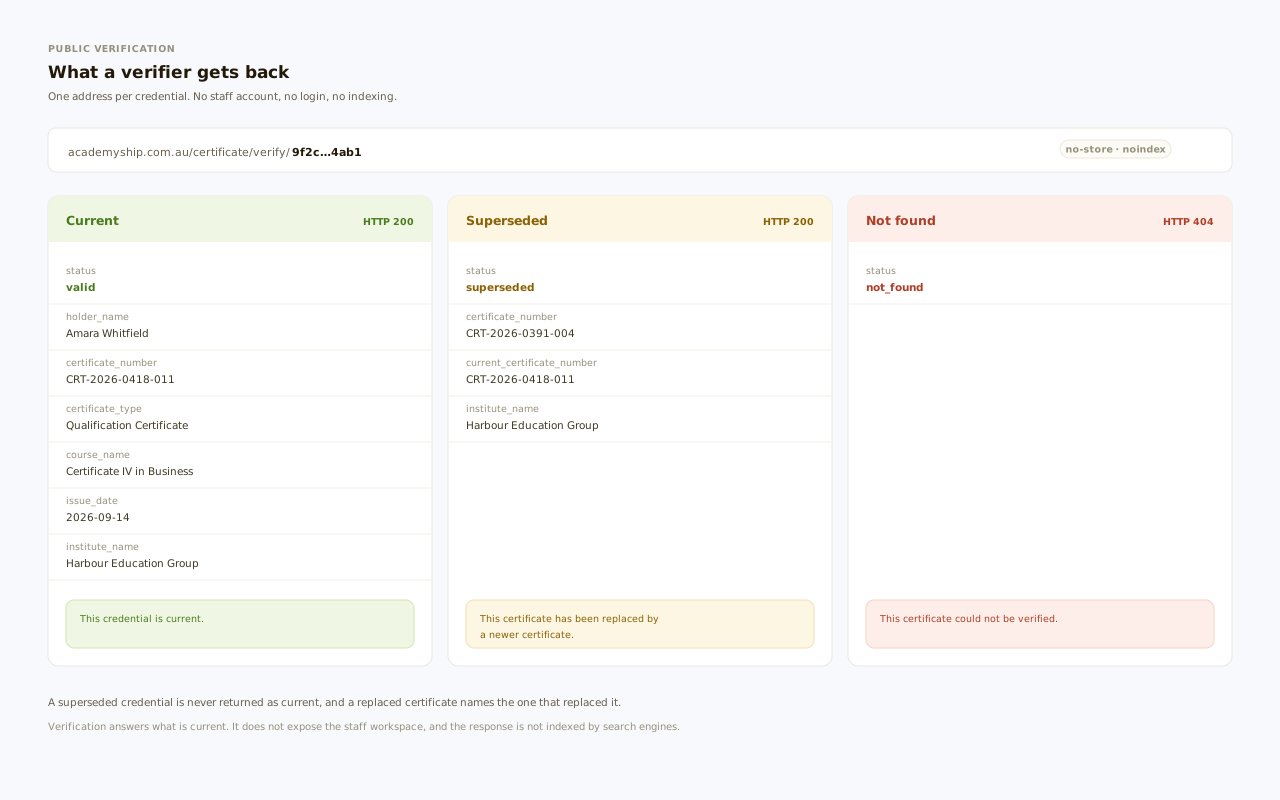
Let a verifier check the credential, course and status.
Why issuance breaks
A Certificate Is Only Credible When Every Decision Behind It Holds Up.
The PDF is the final step. The risk begins earlier—when results, eligibility, templates, documents and approval live apart.
Academyship connects the award, course, type, template, rules, documents, review and verification—so the credential has one traceable story.
- One credential decision the whole run reads from
- Holds and waivers inside the issuing task
- Certificate, transcript and letter produced together
- A human release decision where the course needs one
- Revision history and a current-status answer
Wrong template, right learner
A flat template list leaves operators guessing which credential belongs to the course.
Templates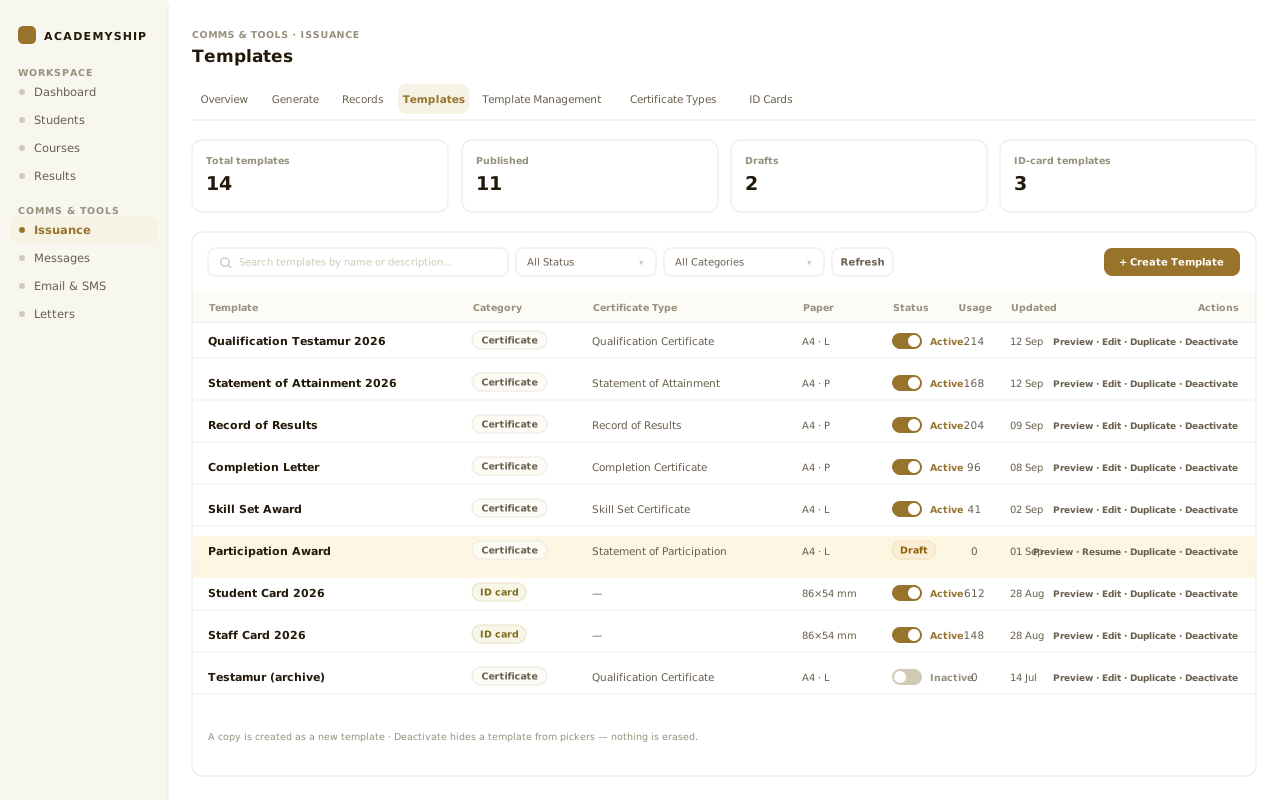
A hold appears too late
Fees, library items and completion evidence are checked beside the task, not inside it.
Eligibility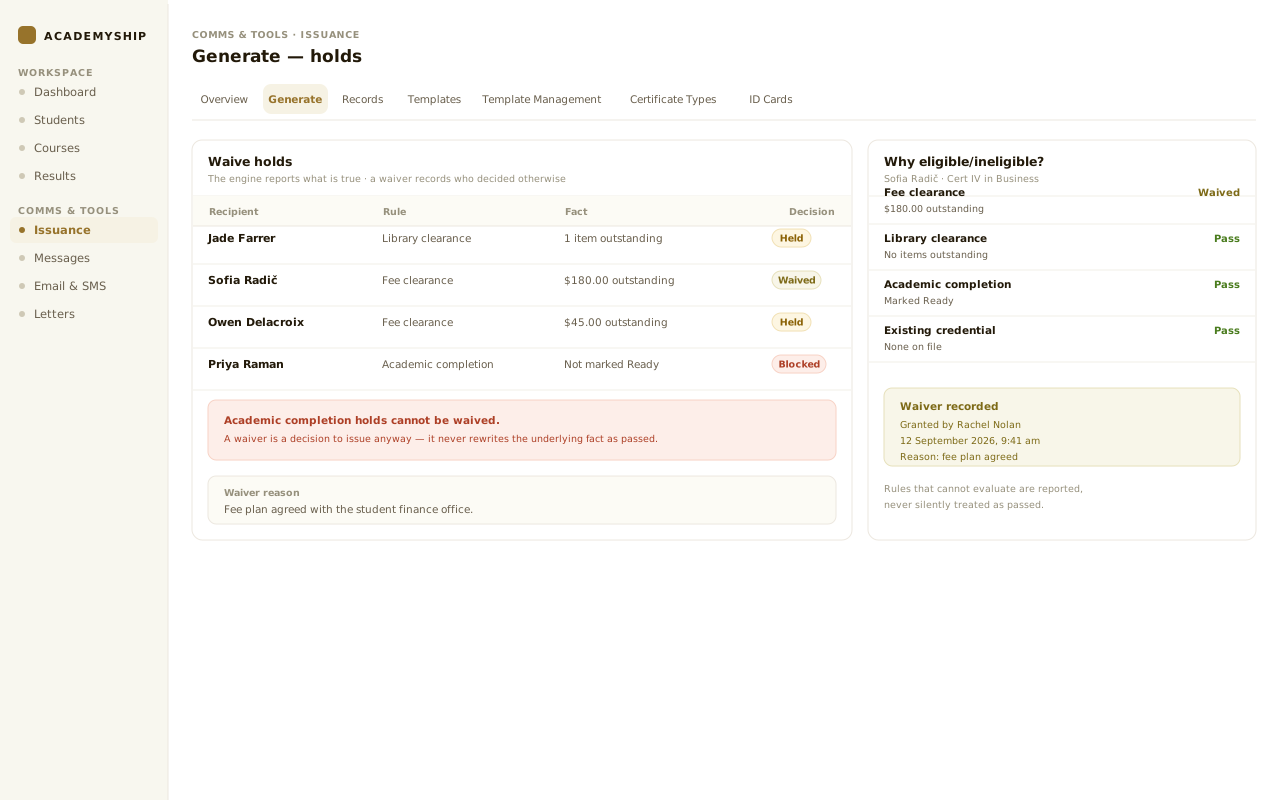
The certificate package splits apart
The testamur, Record of Results and letter are prepared separately and can drift.
Documents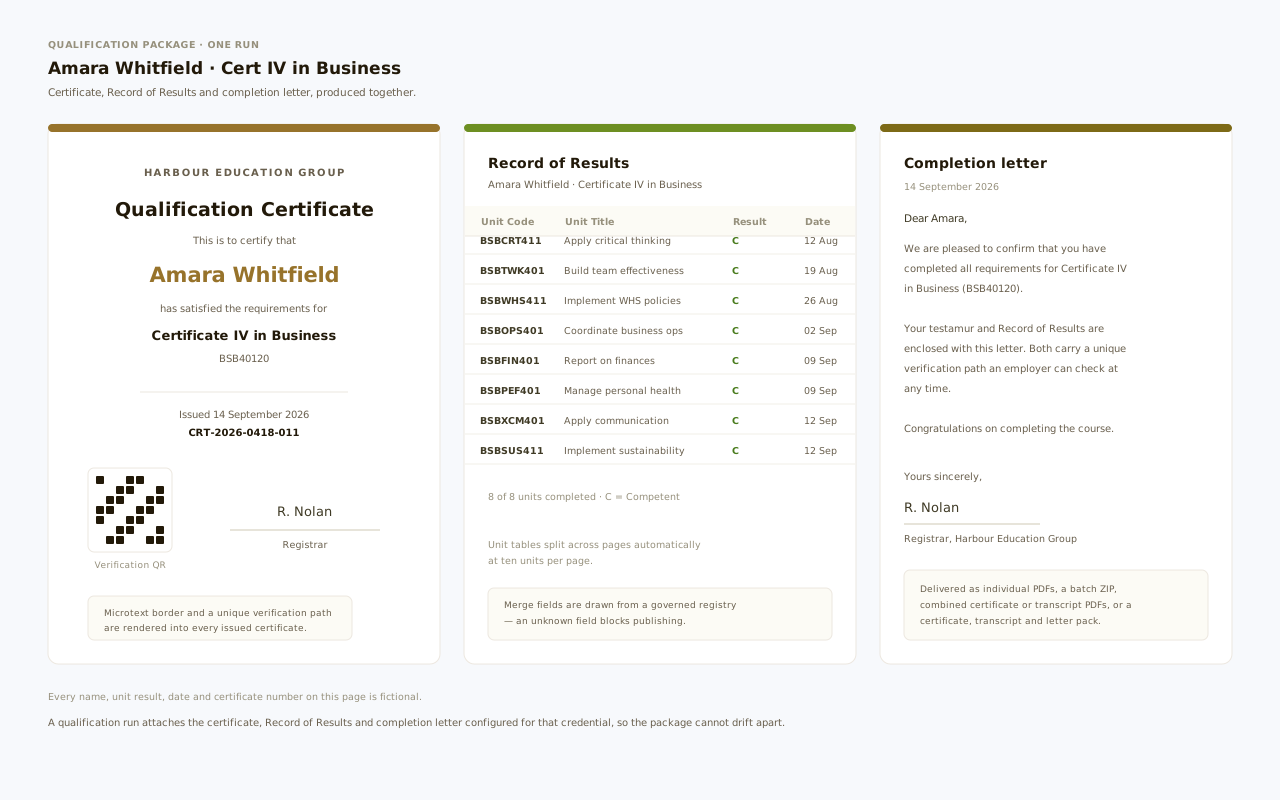
Release outruns review
Files reach learners before anyone has checked the real output or recorded a decision.
Approval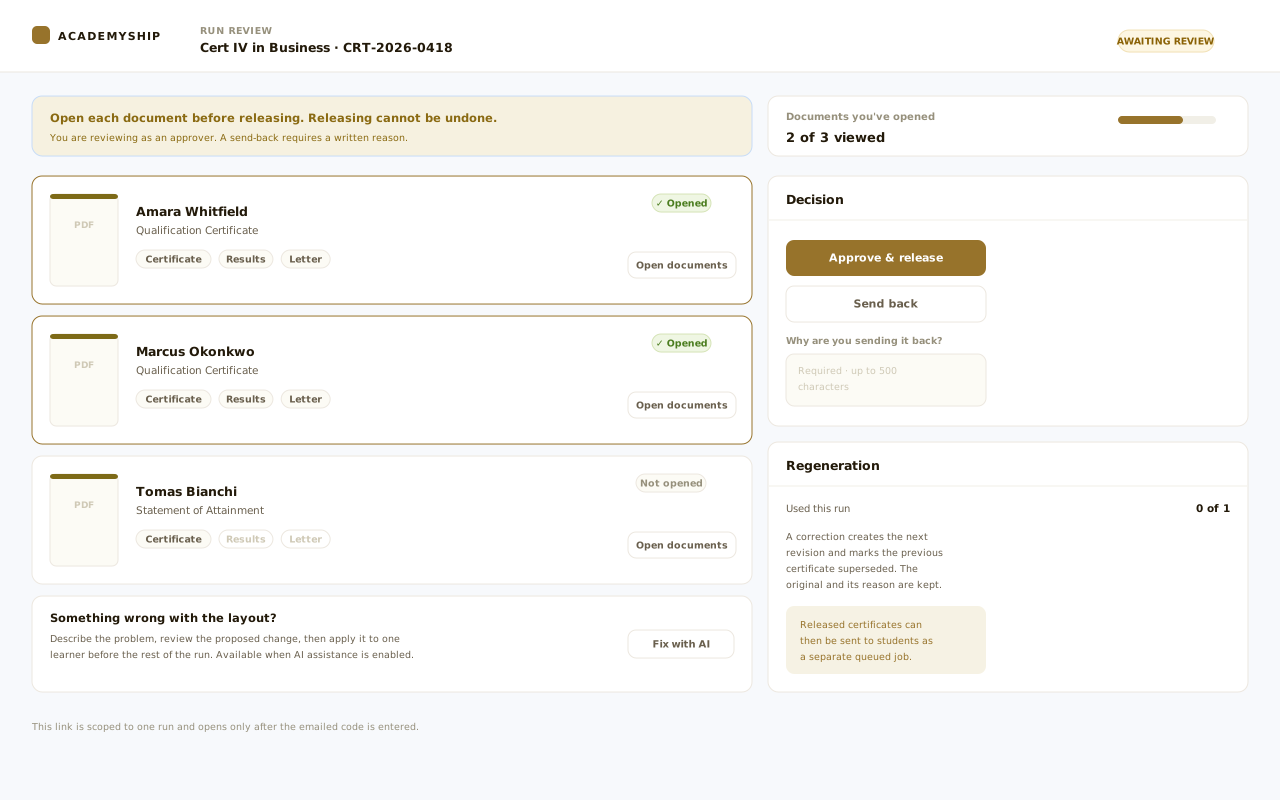
Connected issuance data
From Completion Evidence to a Verifiable Credential—Without Re-Keying the Story.
The workflow starts with the learner and course, resolves the configured credential, applies the rules and builds the document package.
Evidence in
- Learner and enrolment
- Course and award outcome
- Completion status
- Fee and library facts
- Existing credential
Issuance control
- Credential and course setup
- Certificate type and template
- Binding priority and rules
- Holds, waivers and exceptions
- Run plan and review gate
Trusted outputs
- Certificate or Statement of Attainment
- Record of Results and letter
- PDF, batch package and email
- Revision and supersession history
- Current-status verification
How issuance works
Move from Ready Learners to Released Credentials in Four Controlled Steps.
Configure the decision once, preview what the run will do, let the queue render, then put a human decision before delivery.
-
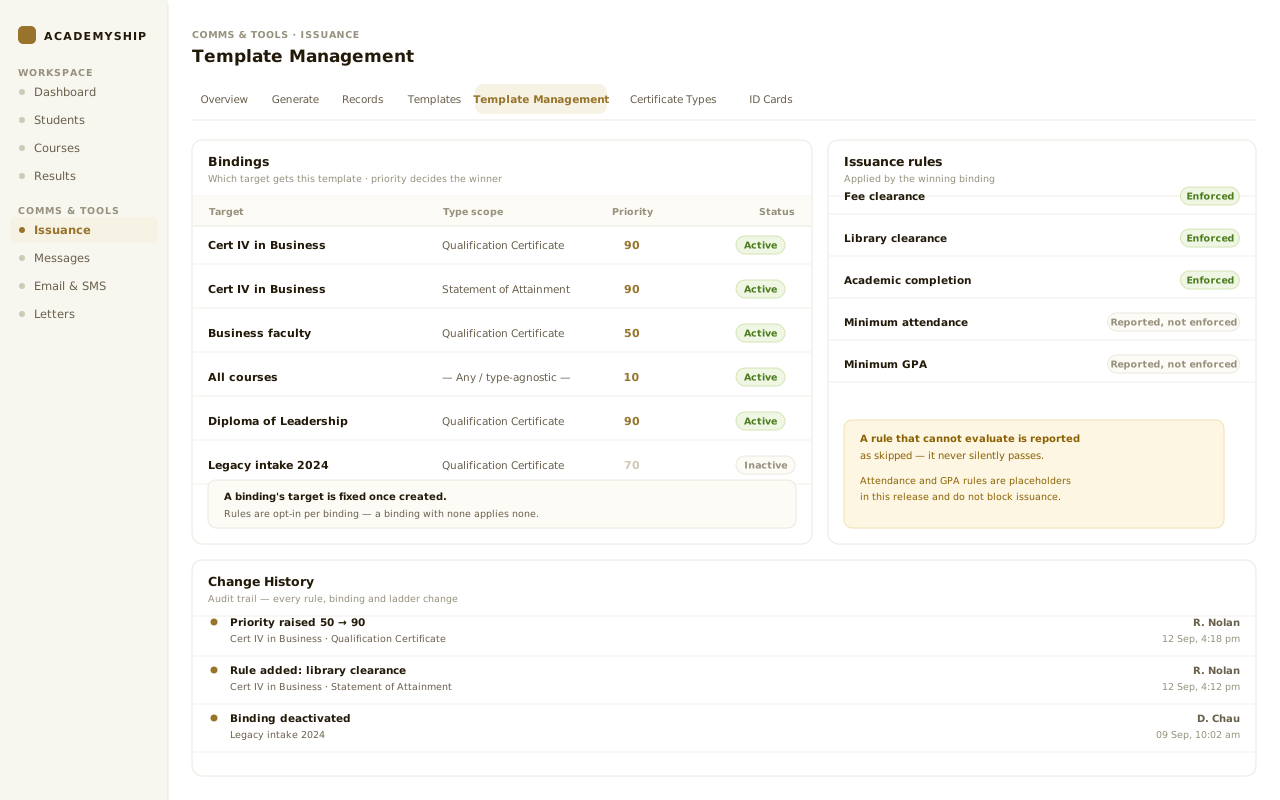
Configure once
Bind each course award to the Certificate Type and template that should win, set its priority, and attach the transcript and letter for that credential.
Qualification and Statement of Attainment routes stay distinct; an award with no binding is a named configuration gap, not a guess.
-
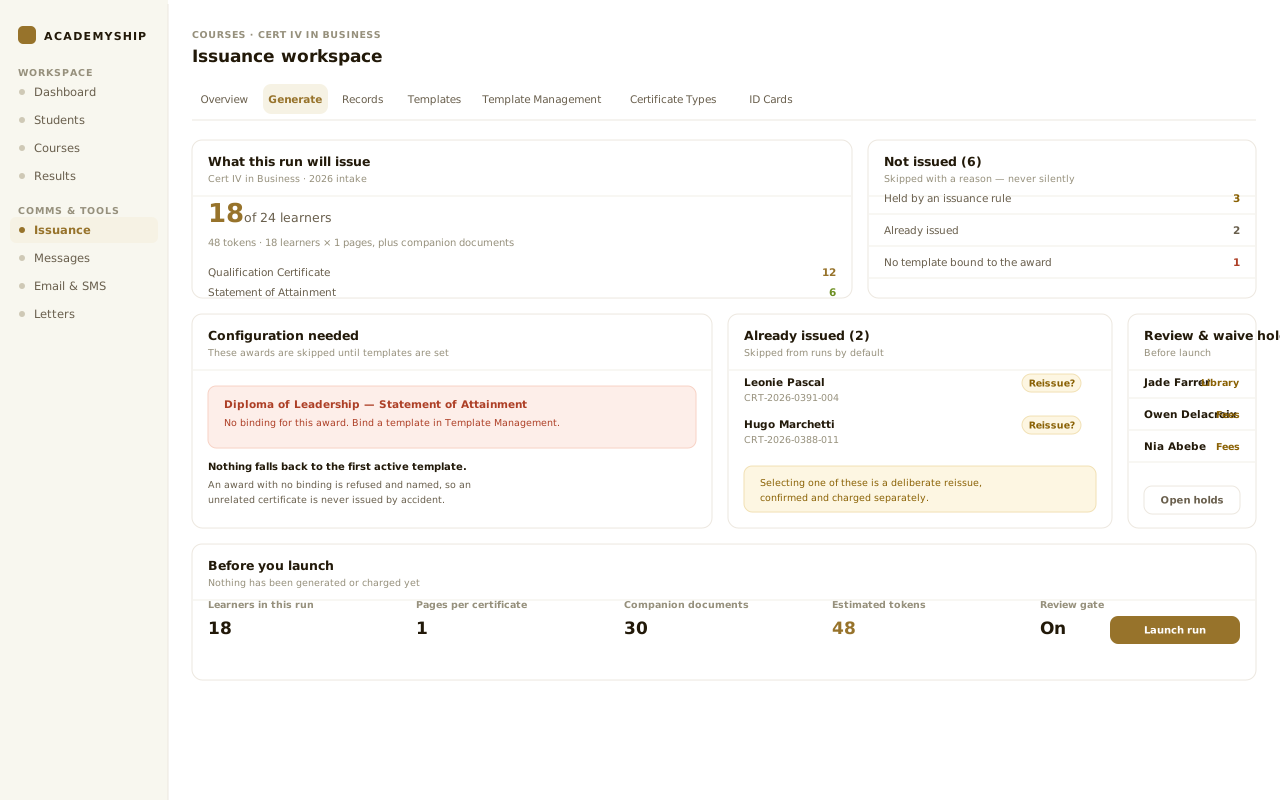
Preview the decision
See ready, skipped and already-issued learners, holds and waivers, the document package, page count and token estimate before anything is generated or charged.
-
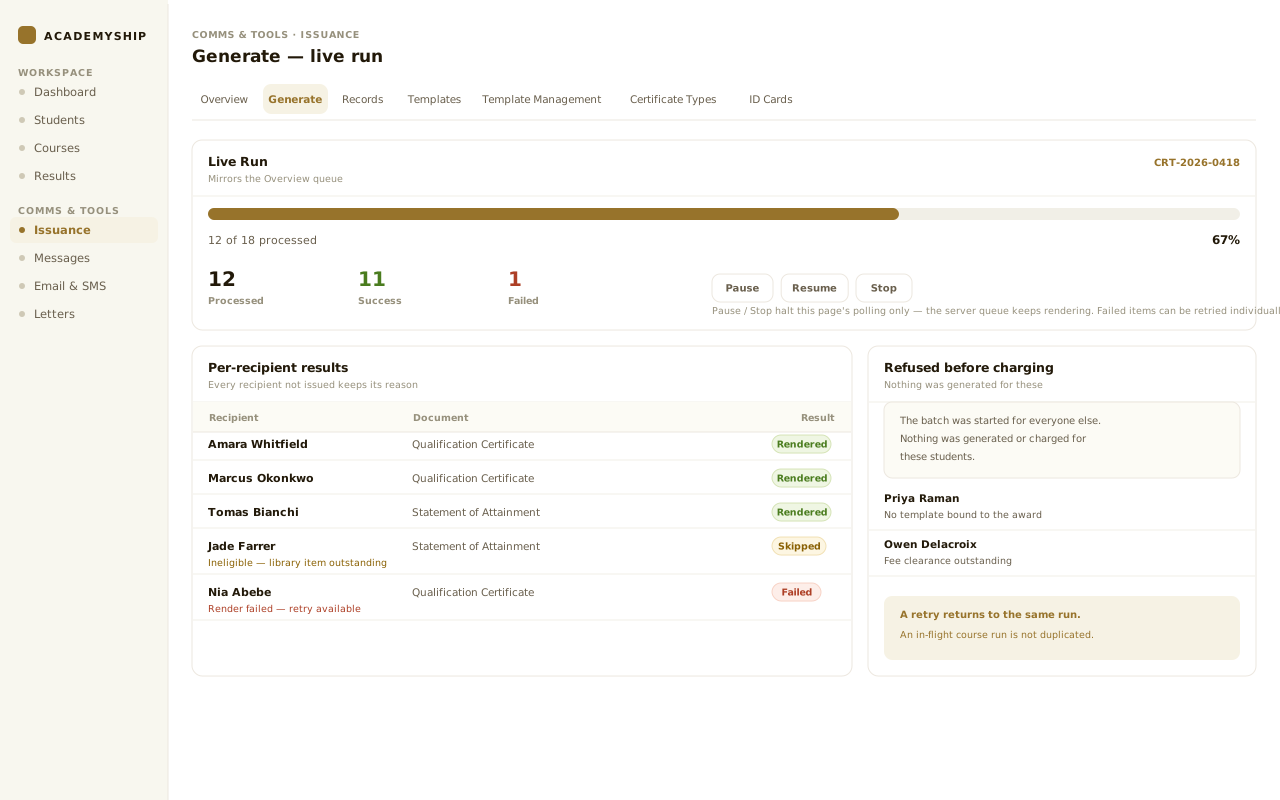
Generate in the background
Launch the run and keep working while queued chunks render. Every recipient who was not issued keeps its reason.
A retry returns to the same run; an in-flight course run is not duplicated.
-
Review, release and prove
When approval is enabled, an approver opens every document, corrects or sends the run back with a reason, then releases it for delivery and verification.
What Certificates covers
The Setup, Decisions and Delivery Behind Every Issued Credential.
Each workspace answers a different operational question, while the learner, course and issued files stay connected.
Academyship
01
Credential setup
Set each course’s credential and who receives it before generation begins. Qualifications, Statements of Attainment, Records of Results and companion documents share one setup.
- Qualification and Statement of Attainment
- Record of Results and Skill Set
- Companion transcript and letter
- Student or employee recipients
Academyship
02
Types and templates
Manage system and custom certificate types with the templates that produce them. Names, codes, colours, previews, duplicate layouts and approved merge fields share one library.
- System and custom Certificate Types
- Name, short code, icon and colour
- Template list, preview, duplicate
- Governed merge fields
Academyship
03
Rules and bindings
Connect the correct template to its academic target and certificate type before a run begins. Priorities, active status and preview history make the selected issuing rule clear.
- Academic target and type scope
- Binding priority and status
- Opt-in issuance rules
- Resolve & Preview, change history
Academyship
04
Generation and review
Select recipients, review holds and estimated costs, then start a controlled certificate run. Live progress and protected review keep generated documents visible before delivery.
- Selected recipients or a course run
- Holds, waivers and cost first
- Queued generation, live progress
- Run-scoped, code-protected review
Academyship
05
Records and verification
Find issued credentials by recipient, preview or download them and prepare bulk delivery. Current and superseded statuses help staff answer verification questions from one record.
- Completed certificates by recipient
- Preview, download and email
- Bulk email and batch files
- Current or superseded status
Scroll sideways, or use the arrow, Home, End and Page keys, to reach every card.
The generation cockpit
Know What Will Be Issued Before a Single Page Is Rendered.
The Generate workspace brings the recipient, credential, template, eligibility result and cost into one surface.
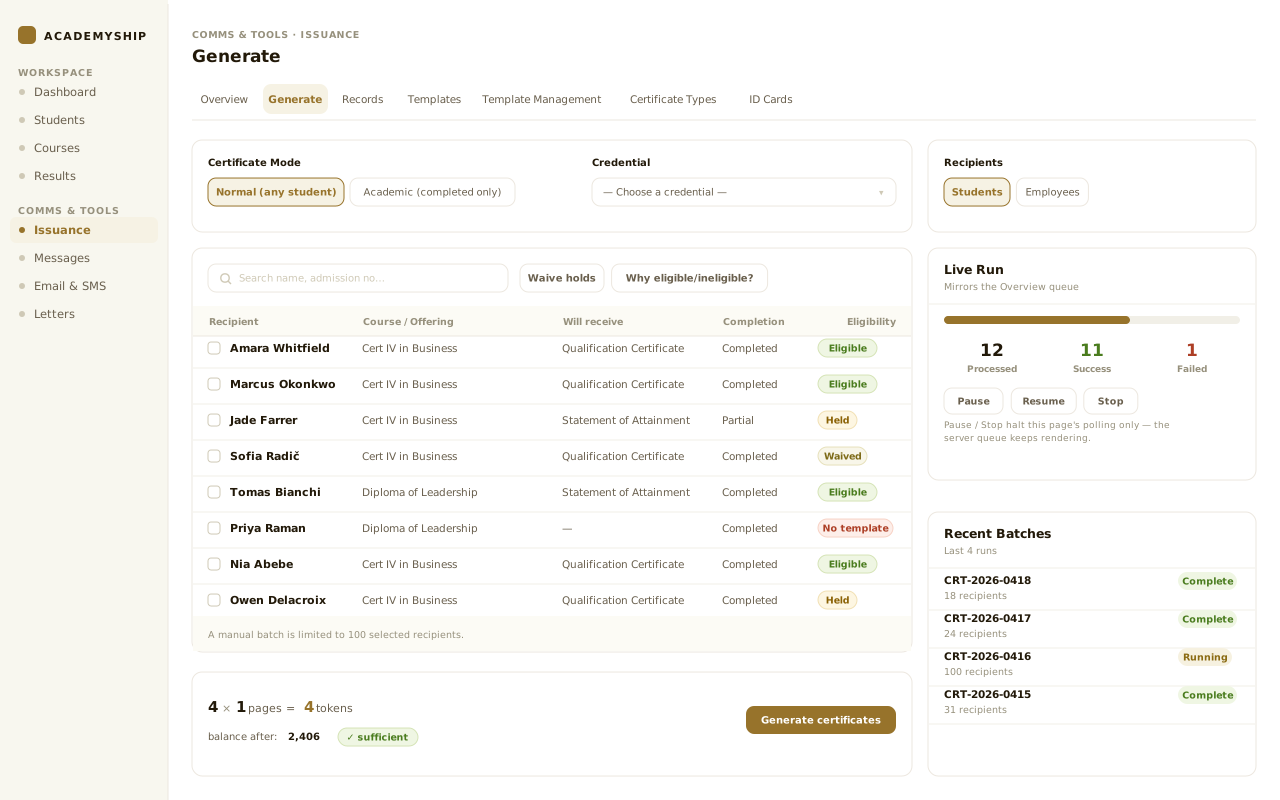
1
Choose the recipient path
Switch between students and employees, and narrow the list to those who have completed.
2
Name the credential
Select the configured credential, or a manual template when the saved setup does not apply.
3
Read eligibility before selection
Held recipients are explained before the batch, and the server re-checks eligibility at generation time—the badge is not the only gate.
4
See the whole package and cost
Companion documents drive the page count, the estimate and the balance left after.
5
Follow the live run
Processed, successful and failed totals update beside recent batches.
Fictional institution. Every learner, course, unit result, certificate number and date shown on this page is invented for demonstration.
Mixed cohort resolution
One Cohort. The Right Award for Each Learner.
A course run separates full-qualification learners from Statement of Attainment learners.
A course run resolves the configured type and template for each group and attaches the right companion documents. Missing setup becomes a visible configuration gap.
Nothing falls back to the first active template. An award with no binding is refused and named.
- Full qualification and SOA stay distinct
- Skipped learners keep an exact reason
- Already-issued learners need a deliberate choice
Capability example
Human release control
Review the Real Files Before They Reach the Learner
When approval is enabled, every document stays held behind a run-scoped review link.
An approver opens the real files, regenerates a correction, releases, or sends the run back with a reason. Release is recorded on the run.
A correction creates the next revision and marks the previous credential superseded. The original and its reason are kept.
- Approver and watcher stay separate
- A send-back needs a written reason
- Where enabled, AI proposes a bounded fix
Capability example
Credentials and outputs
Finish Issuance with Files People Can Use— and Evidence Your Team Can Defend.
Different audiences need different outputs: the credential, the batch detail, or a status answer.
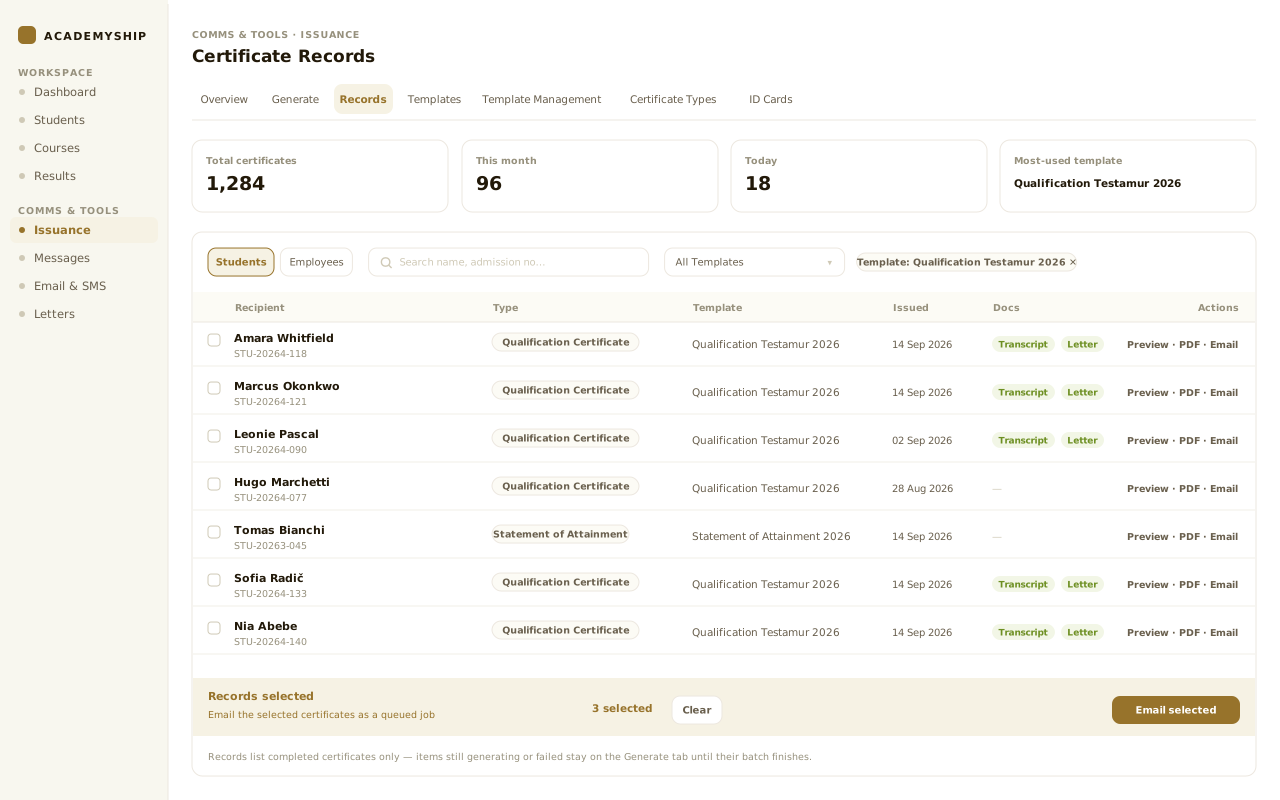
Credential documents
- Qualification Certificate — PDF
- Statement of Attainment — PDF
- Record of Results — PDF
- Statement of Participation — PDF
- Completion Certificate — PDF
- Skill Set Certificate — PDF
Delivery packages
- Individual certificate — PDF
- Certificate and transcript pack — ZIP
- Batch download — ZIP
- Combined certificates — PDF
- Combined transcripts — PDF
- Single and bulk email — Email
Operational evidence
- Per-recipient batch results
- Skipped and failed reasons
- Eligibility and waiver context
- Reviewer decision and note
- Revision and supersession history
- Public status check — Web
The same workspace also generates student and employee ID cards, as PNG or print-PDF, without consuming certificate tokens.
Configurability
Configure the Credential Once. Keep the Decision Consistent at Issue Time.
Twenty-four settings, grouped by the four questions they answer.
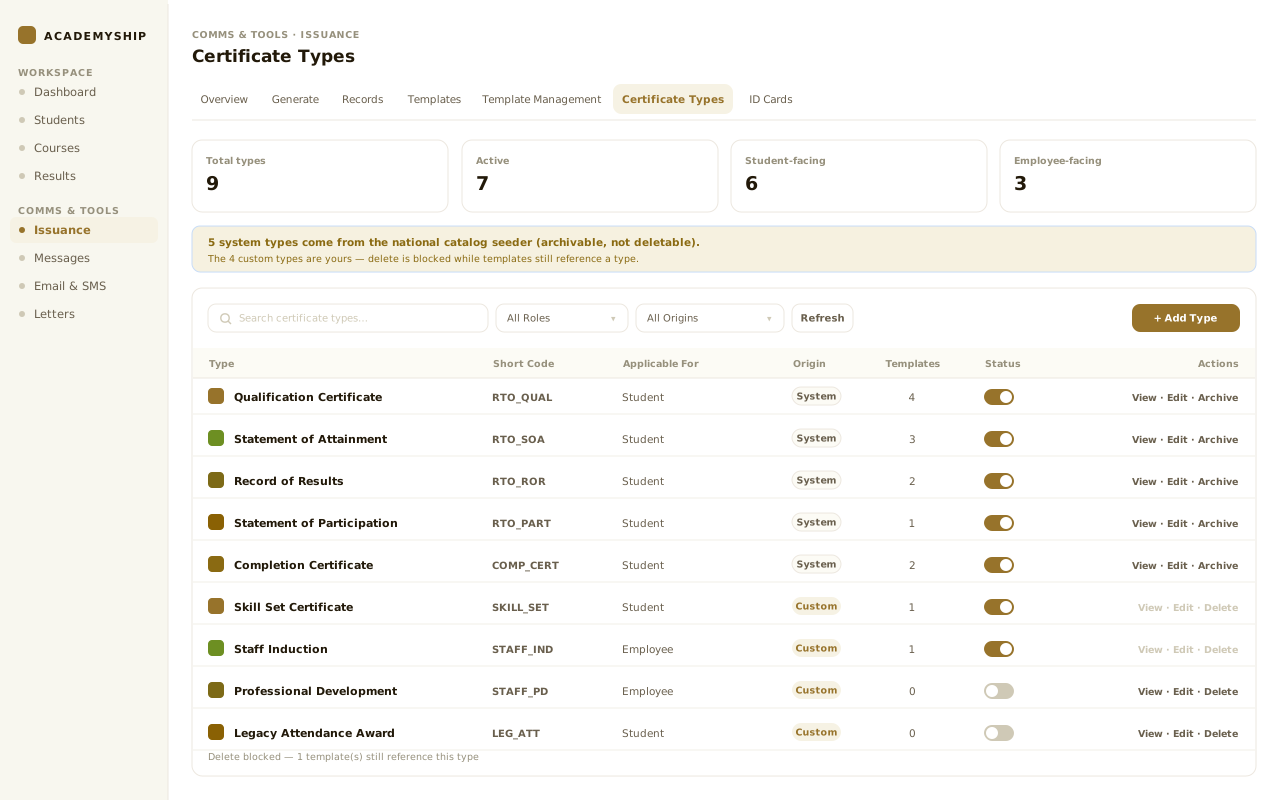
What an administrator can change depends on your setup.
Access and responsibility
Separate Configuration, Generation and Release Without Breaking the Workflow.
Certificate work is consequential. Your existing roles decide who configures templates, generates credentials and releases them.
Responsibility group
Certificate administrator
Shapes the system without running every cohort.
- Maintain Certificate Types and templates
- Bind templates to courses and awards
- Set binding priority and eligibility rules
Why this is separated
Whoever decides which template wins need not be whoever issues to a cohort.
Responsibility group
Issuance operator
Plans the run, resolves holds and follows the exceptions.
- Plan recipients, documents and cost
- Launch generation and follow progress
- Prepare a run for review or delivery
What this group works from
A plan, not a guess: skipped, held and already-issued learners are named before launch.
Responsibility group
Approver or watcher
Holds the release decision, or stays informed without it.
- Open the real certificate and documents
- Release the run, or send it back
- Watchers follow by email instead
About the review link
A review link is scoped to one run and opens only after the emailed code.

An RTO graduation run
Operations launches the cohort from a plan naming who is skipped, who is held and which awards have no template bound.
Nothing is generated or charged until the run is launched.
A single correction
An approver spots a detail issue, records the reason and regenerates a revision without erasing the original.
Each run carries its own regeneration allowance.
An external check
An employer follows the verification path and sees whether the credential is current, superseded or unavailable.
No staff workspace access is involved.
1 of 3
Closer in
Six Controls That Make Issuance Faster Without Making It Loose.
Six controls, and the mistake each one prevents.
-
Course-aware credential setup
Save the certificate and document choices against the course, so operators select what they are issuing instead of rebuilding it each time.
-
Template resolution you can inspect
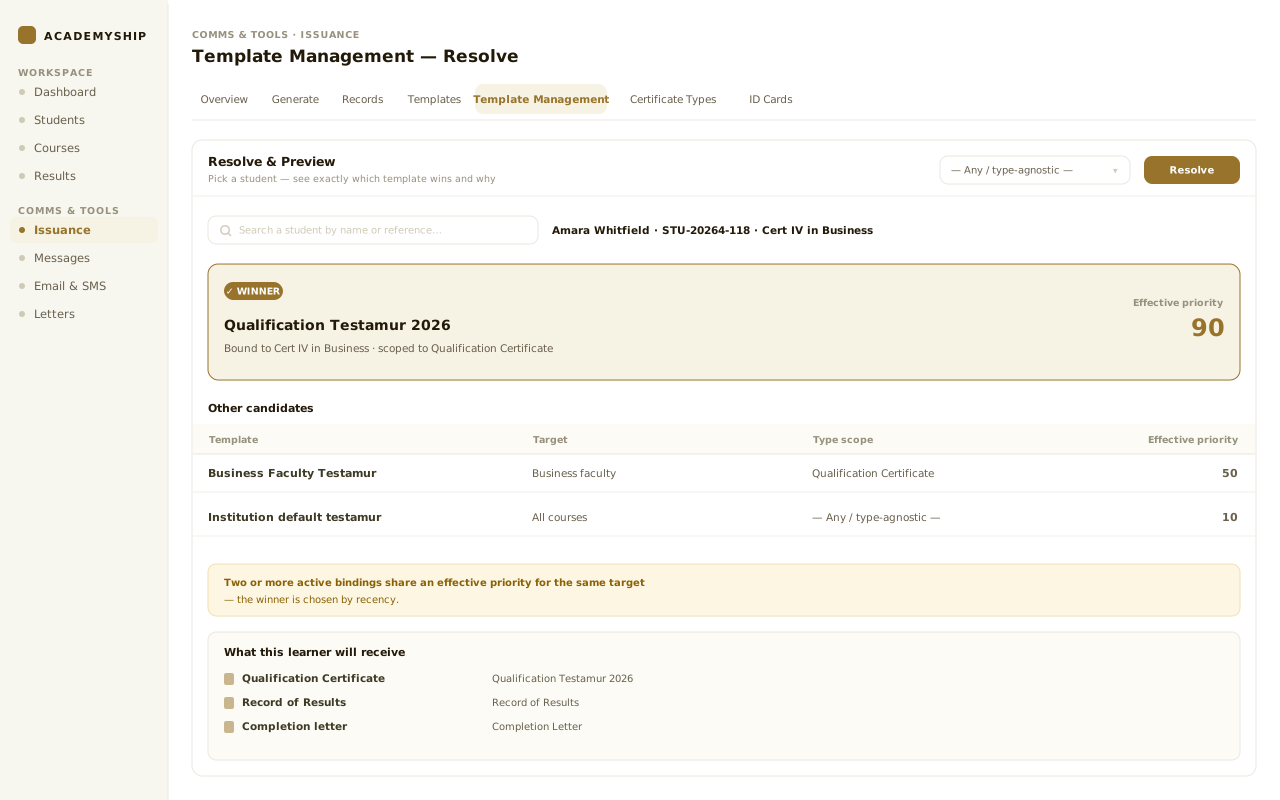
Bindings, type scope and priority decide the winning template, and Resolve & Preview explains the result for a chosen learner first.
-
Holds with accountable waivers
A blocked rule keeps its reason. A waiver adds who, when and why rather than pretending the condition passed.
-
Duplicate-resistant runs
A launch key absorbs retries, while a course-level guard stops two operators starting competing runs for the same cohort.
-
Corrections that preserve history
Regeneration creates the next revision and marks the previous credential superseded, so verification points to what is current.
-
Review-assisted layout correction
Where enabled, an approver describes the problem, reviews a bounded change and tests it on one learner before the rest of the run.
Questions
Certificate Questions, Answered Before the First Run.
The detail a registrar asks about once the obvious questions are done.
Which credentials can Academyship issue?
The configured catalogue supports Qualification Certificates, Statements of Attainment, Records of Results, Statements of Participation, Completion Certificates and Skill Set Certificates. Your team can also maintain institution-specific Certificate Types. What appears in the picker depends on your active templates.
Can one cohort receive different certificates and document packages?
Yes. A course run separates full-qualification learners from Statement of Attainment learners, resolves the configured type and template for each, and attaches the Record of Results or letter defined for that credential. The plan shows both groups first.
What happens when a learner is not eligible?
The learner is held or skipped with the rule and reason shown to the operator. Proven checks include completion context plus fee and library clearance where available. A waiver records the block, the reason, who granted it and when—it does not rewrite the fact as passed.
Can we review certificates before they are sent?
Yes. Approval can be required for the courses that need it. The run stays held while an approver opens the real documents through a run-scoped, code-protected link, then releases it or sends it back with a written reason. A watcher is kept informed by email without the decision.
How are mistakes, corrections and reissues handled?
A correction regenerates a revision and marks the earlier credential superseded, keeping its history and the reason. A deliberate reissue is separate: the operator sees the existing credential and explicitly selects that learner.
Can an employer verify a certificate?
Yes. A unique verification path reports the holder, certificate number, Certificate Type, course, issue date and institution for a current credential. If it has been replaced, the response identifies it as superseded rather than presenting the old version as current.
How can completed certificates be delivered or downloaded?
Your team can preview and download an individual PDF, email one certificate, queue a bulk email job, download a batch ZIP, create combined certificate or transcript PDFs, and assemble a certificate and transcript pack where those exist.
Comms & Tools · Certificates
Ready to Turn Completion into a Credential You Can Stand Behind?
See how Academyship connects course setup, eligibility, generation, human review, delivery and verification in one controlled Certificate workflow.
Plan before rendering
Review before release
Verify after delivery
A certificate run moves through five stages
- Configure
- Check
- Generate
- Review
- Release